
kappa
Event Classification GUI
Description
Kappa is a graphical user interface for interactive event classification. It provides a Summary tab for a final event classification based on different observations and preliminary type guesses which are presented in the observation tabs.
Summary and classification
The summary tab is the main tab for making interactive event classifications. The preliminary type guesses and certainties from the individual observations are presented for joint evaluation in the table Feature results. A type selection can be made below in the Event type ranking.
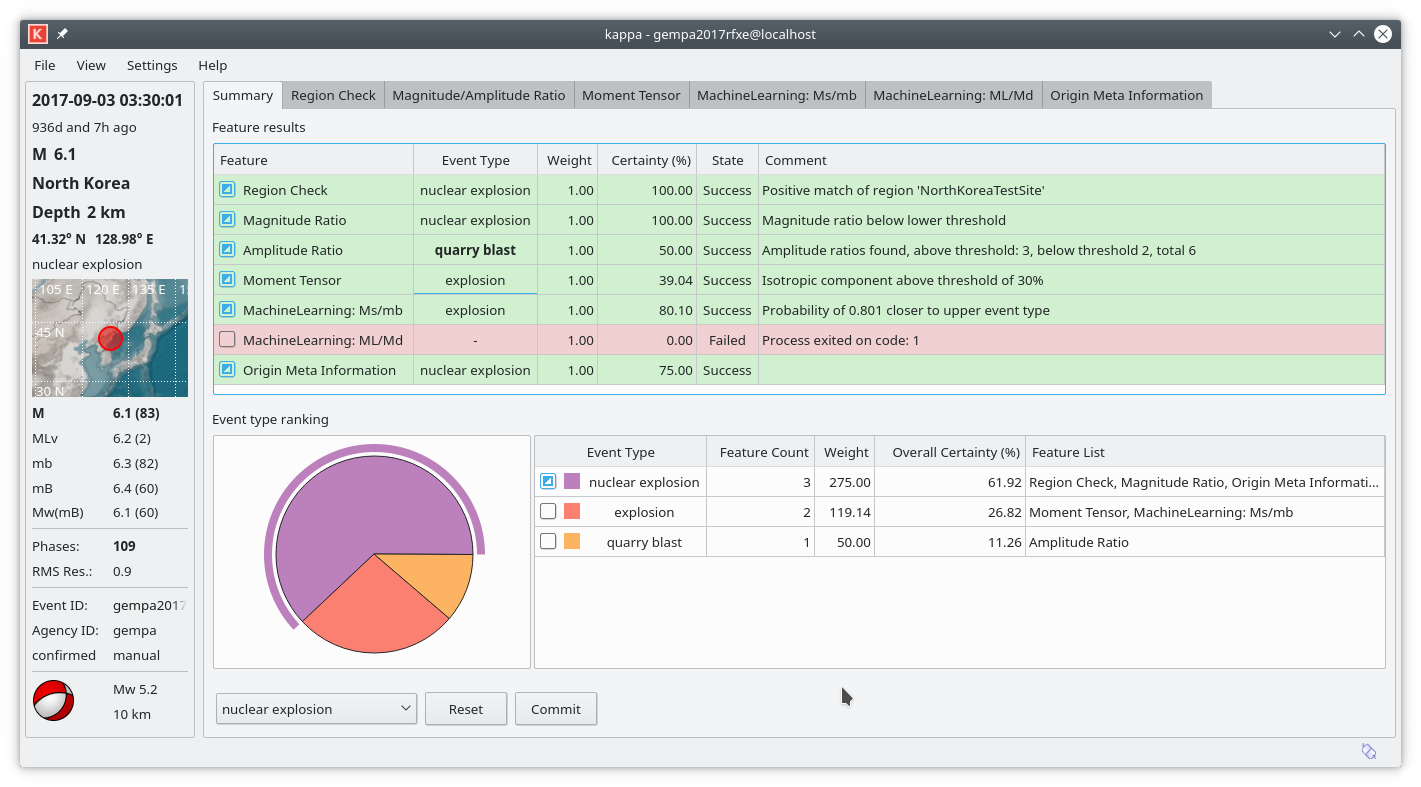
Figure 1: Summary tab with individual observations and the final ranking.
Feature results table
The row show the preliminary type guesses from the individual observations. The color indicate the status of the applied methods:
green: the observations are available and could be evaluated,
blue: the observations are being processed,
red: the observations are not available or the processing was not successful.
When the preliminary event type different from the default, it is highlighted in bold letters.
The different observations and methods may results in different suggestions for the event type or even no decision at all. To every observation a certainty is automatically assigned which can be adjusted manually. Together with the weight, an overall certainty is computed from the event type suggestions.
Event type ranking
In the lower part, the event type suggestions are summarized. The most likely type is shown at the top of the table. They pie chart visualizes the relative certainties of the different types. The colors correspond to the rows in the table to the right.
For making a final classification, select the event type in different ways:
Pie chart: Click on the type in the pie chart. The selection is highlighted by the circle segment outside the pie chart. In the pie chart the type can also be selected by using the courser keys or the mouse wheel and then pressing the Enter key.
Table: Click on the row of the table. In the table the type can also be selected by using the courser keys then pressing the Enter key.
Pull-down menu: Select the type from the pull-down menu in the lower part of the Summary tab.
Press Commit to send the decision to the SeisComP messaging system.
Note
To revise a classification simply select the correct one an press Commit again.
Detailed observation tabs
The observations can be reviewed in the different observation tab. They provide automatic preliminary guesses of the event type based on the presented observation. The type along with the certainty can be interactively adjusted.
Note
The behavior of all observation tabs can be configured in the module configuration of kappa. The parameters contain the alternative event types, fallback event types, thresholds, etc.
Region check
The region check tab shows the event location and the relation to pre-defined polygons. If the polygons contain information about the event type and the hypocenter of the event lies within the polygone, the preliminary type is given to the selected event.
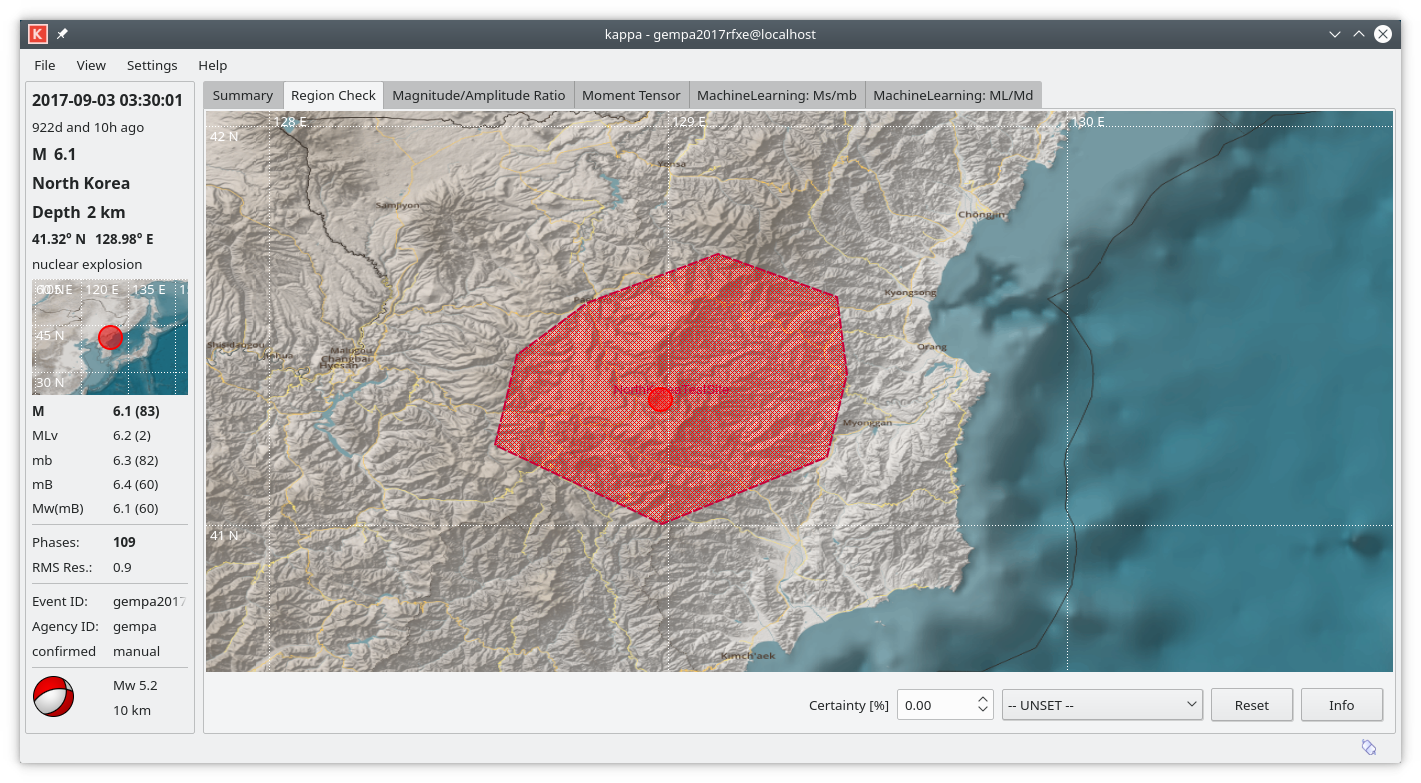
Figure 2: Region check tab
Magnitude / Amplitude Ratio
The Magnitude / Amplitude Ratio tab shows the network magnitude ratio of Ms_20 vs. mb. Upper and lower thresholds along with event types and example data points are configurable. If the selected event is below the lower or above upper thresholds, the respective preliminary event type is given with a certainty of 100%. If the event type is in between, the type and the certainty are given based on the event type associated to the closest threshold line.

Figure 3: Magnitude-Amplitude tab. The colors representing the event types and the thresholds are configurable.
Note
Hold the mouse over an example point to read more information about this event.
Moment tensor
The moment tensor tab provides the full information about the moment tensor, its components and the derived focal mechanism values such as focal mechanism and principle axes. The beach balls represent the full moment tensor (left) and the double-couple (DC) moment tensor (right). The color of the represent the centroid depth of the moment tensor if given or the hypocenter depth.
The rectangles around the beach balls represent the stations at their azimuth from the event origin. The colors of the station rectangles indicate the average station fit from moment tensor inversion:
green: good fit, low residual
yellow: intermediate
red: low fit, high residual.
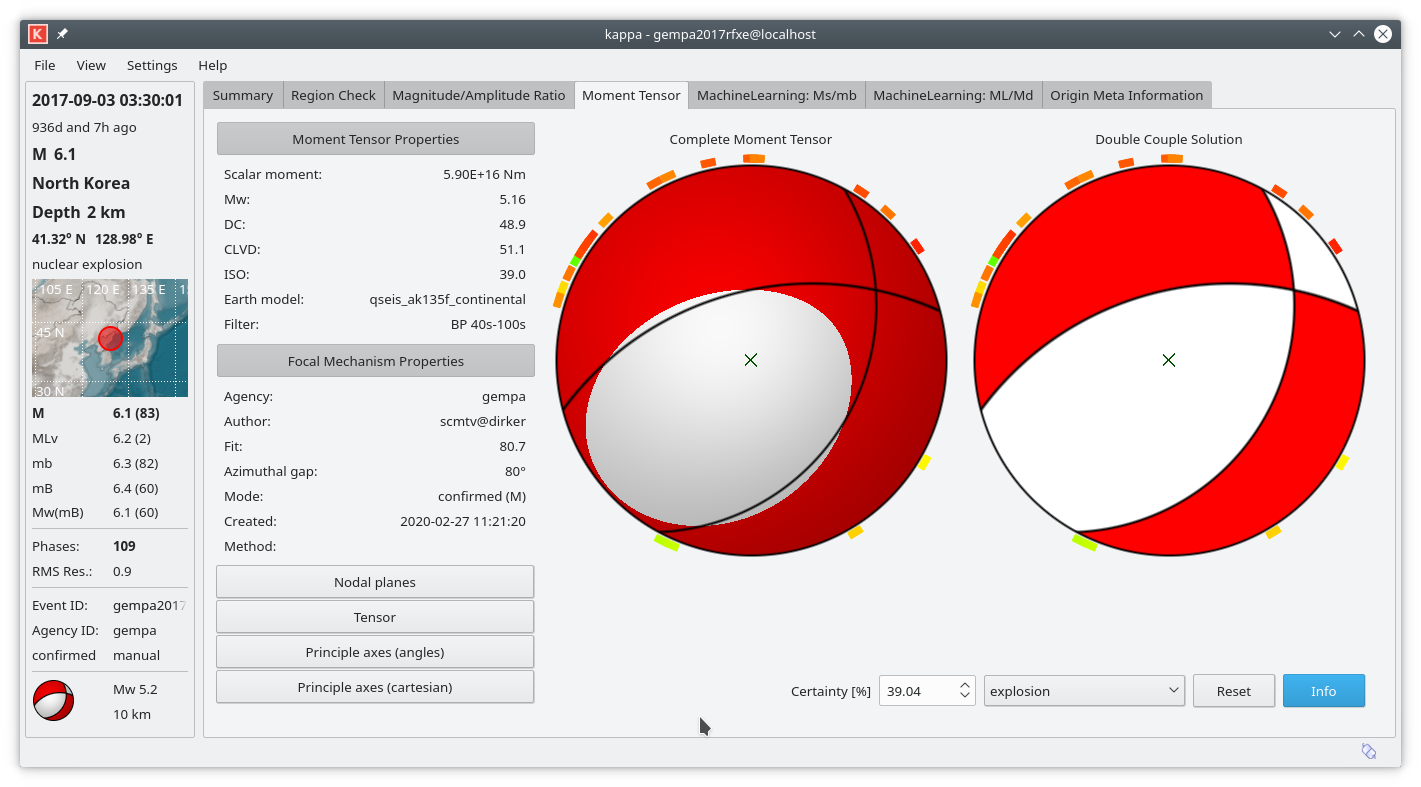
Figure 4: Moment tensor tab. The color of the moment tensors indicate depth: red - shallow, yellow to green - intermediate, blue - deep.
MachineLearning
In the machine learning tabs multiple methods can be added and configured. The machine learning algorithms provide probabilities of particular event types based on provided features. By default, the features are the magnitude ratios:
Ms_20/mb
ML/Md.
The machine learning methods are provided by Python scripts. Additional procedures can be added as profiles.
Note
Machine learning algorithms are executed from configurable Python scripts.
To use other methods simply create a new script and define it in
machineLearning.$name.command.
Ms vs. mb
The MachineLearning: Ms/mb tab compares Ms-mb magntiude ratios of the selected event with provided event examples. The classification and the certainties are based on machine learning. To run the machine learning tool press the Start button.
The gray field to the left shows the progress information and possible errors.
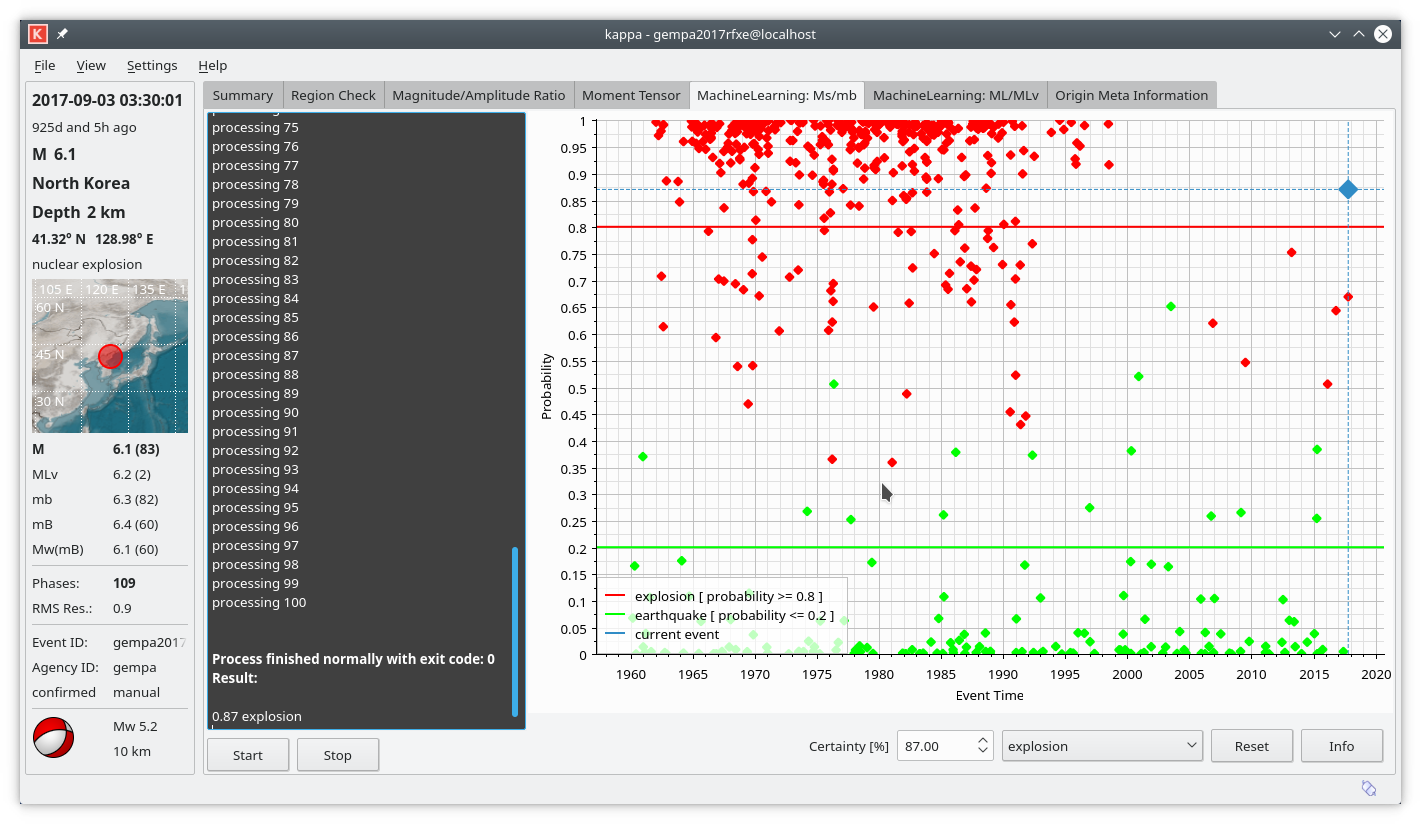
Figure 5: Machine learning: Ms vs. mb
ML vs. Md
The MachineLearning: ML/Md tab compares ML-Md magnitude ratios of the selected event with provided event examples. The classification and the certainties are based on machine learning. To run the machine learning tool press the Start button.
The gray field to the left shows the progress information and possible errors.
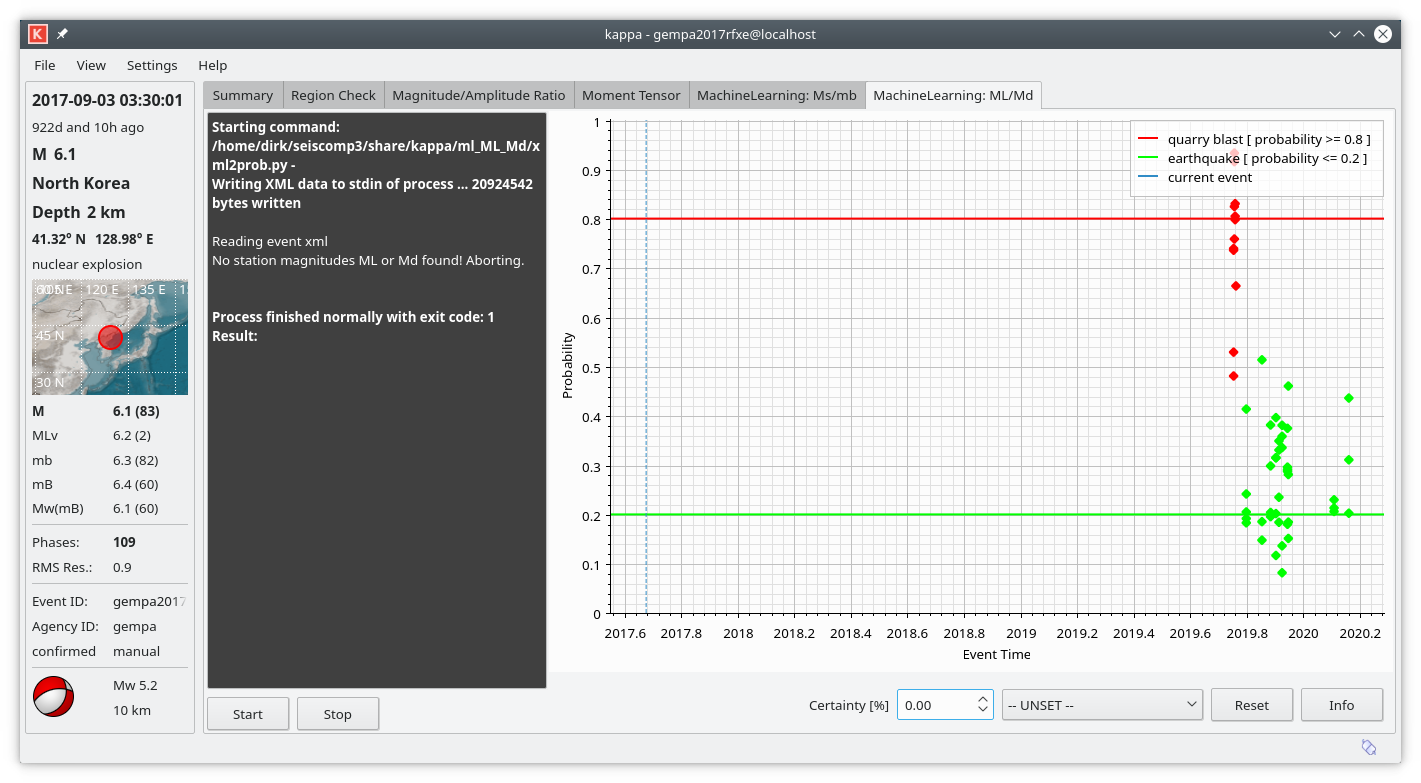
Figure 6: Machine learning: ML vs. Md
Origin Meta Information
Kappa is able to evaluate origin comments.
E.g. the template-based event detector
ccloc can transport the event type of a
master event to the new origin by a comment written to the origin. When the comment is configured in Kappa
and found in an origin of an event, then this is a strong indicator that the event which contains the new origin
is of the same type as the master event. The considered comment is configured by originMeta.idEventType.
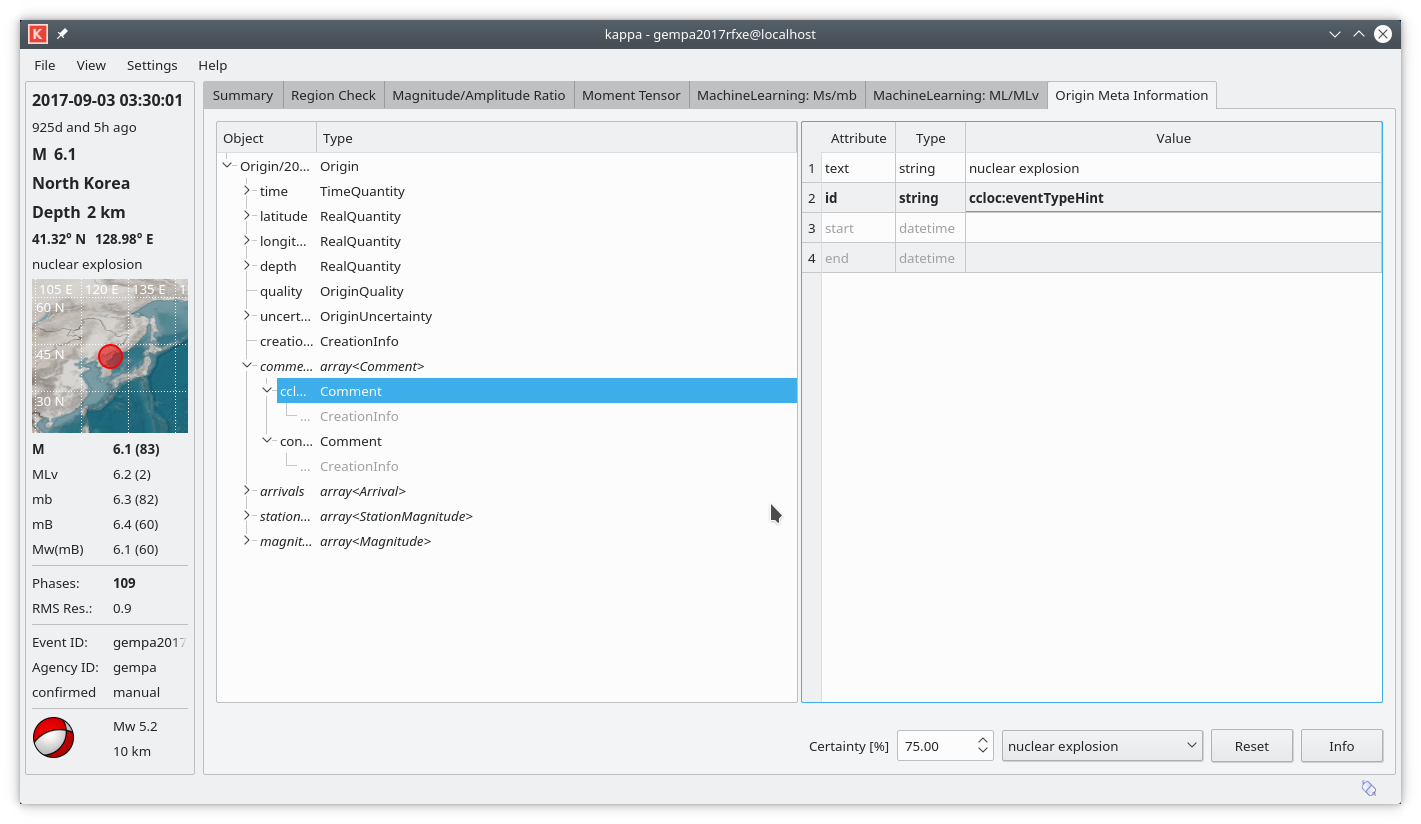
Figure 7: Origin meta information.
Module Configuration
etc/defaults/global.cfgetc/defaults/kappa.cfgetc/global.cfgetc/kappa.cfg~/.seiscomp/global.cfg~/.seiscomp/kappa.cfgkappa inherits global options.
Note
Modules/plugins may require a license file. The default path to license
files is @DATADIR@/licenses/ which can be overridden by global
configuration of the parameter gempa.licensePath. Example:
gempa.licensePath = @CONFIGDIR@/licenses
- preferredEventTypes
Default:
earthquake,explosionType: list:string
List of preferred event types which should appear on top of event type selection boxes.
- eventTypeColors
Default:
earthquake:b3de69,explosion:fb8072,"nuclear explosion:bc80bd","quarry blast:fdb462","sonic blast:80b1d3"Type: list:string
List of eventType to color mappings, e.g., earthquake:00ff00, explosion:ff0000.
- inputDir
Type: directory
Default directory used in file open dialog.
- outputDir
Type: directory
Default directory used in file save as dialog.
Note
scripts.* Configuration of custom scripts
- scripts.export
Type: string
Command executed when pressing the export button. The current EventParameters object including the selected event type will be serialized and passed on to stdin. In addition to the default SeisComP environment variables (e.g., @DATADIR@) the following event context variables will be resolved in the command string: EID, OTIME, LAT, LON, DEPTH, MAG, MAGTYPE, ETYPE, EVALMODE, EVALSTATUS, REGION. The use of apostrophe is recommended because some of the variables might be resolved to strings including spaces.
Note
regionCheck.* Evaluates the event’s hypocenter against a spatial region. Events within a region are flagged as positive, outside as negative. The event type is set accordingly.
- regionCheck.enabled
Default:
falseType: boolean
Defines whether this plugin should be available.
- regionCheck.name
Default:
Region CheckType: string
Name of the plugin used in tab and summary table.
- regionCheck.weight
Default:
1.0Type: double
Weight of the event type reported by this plugin.
- regionCheck.defaultEventType
Type: string
Event type used as fallback when no other type applies. Leaving it empty will not propose a type. See @ROOTDIR@/include/seiscomp/datamodel/types.h or scolv for a list of supported event types.
- regionCheck.defaultMinDepth
Unit: km
Type: double
Minimum hypocenter depth required for the default event type.
- regionCheck.defaultMaxDepth
Unit: km
Type: double
Maximum hypocenter depth allowed for the default event type.
- regionCheck.regions
Default:
!rejectType: list:string
The list of closed BNA or GeoJSON polygon names defining regions for flagging event as positive or negative. A polygon name defines a positive region but names with prefix ! (exclamation mark) define negative regions. Evaluation is done in the order of the polygons. The last matching criteria applies and the event type is set accordingly.
If events are neither within positive nor negative regions, then the event type is set to "outside of network interest". Using "accept" will not classify such events.
Examples:
Events are flagged positive within the polygon "Germany":
Germany
All events are flagged positive but events within the polygon "quarries" are negative:
accept,!quarries
Events within the polygon "Germany" are flagged positive but all other events and events within the polygon "quarries" are negative:
Germany,!quarries
All events are flagged positive but events within the polygon "Germany" are negative and all events within the polygon "Saxony" are positive:
accept,!Germany,Saxony
- regionCheck.readEventTypeFromBNA
Default:
falseType: boolean
Read the event type from the BNA polygon header. The header must contain the type, e.g., header of a polygon with name "quarry":
"quarry","rank 1","eventType: quarry blast",13
When active, type supersede eventTypePositive and eventTypeNegative. This feature requires a SeisComP version greater than 2018.327.
- regionCheck.eventTypePositive
Type: string
New type of an event which is flagged positive. Ignored if readEventTypeFromBNA is active.
Empty: Do not set type
- regionCheck.eventTypeNegative
Default:
"outside of network interest"Type: string
New type of an event which is flagged negative. Ignored if readEventTypeFromBNA is active.
Empty means default: "outside of network interest"
Note
magRatio.* Magnitude ratio.
- magRatio.enabled
Default:
falseType: boolean
Defines whether this plugin should be available.
- magRatio.name
Default:
Magnitude RatioType: string
Name of the plugin used in tab and summary table.
- magRatio.weight
Default:
1.0Type: double
Weight of the event type reported by this plugin.
- magRatio.defaultEventType
Type: string
Event type used as fallback when no other type applies. Leaving it empty will not propose a type. See @ROOTDIR@/include/seiscomp/datamodel/types.h or scolv for a list of supported event types.
- magRatio.typeX
Default:
mbType: string
Magnitude type to bind to variable X.
- magRatio.typeY
Default:
Ms_20Type: string
Magnitude type to bind to variable Y.
Note
magRatio.upperType.* Formula representing an upper bound for an event type. If the magnitude ratio exceeds the graph described by this formula, then the configured event type is set.
- magRatio.upperType.eventType
Type: string
The event type. E.g., earthquake. See @ROOTDIR@/include/seiscomp/datamodel/types.h or scolv for a list of supported event types.
- magRatio.upperType.formula
Type: string
E.g., x - 0.68
- magRatio.upperType.description
Type: string
Formula description or reference.
- magRatio.upperType.referenceData
Type: file
Name of file containing reference data. Each line is expected to hold a coordinate of form x,y and an event description, e.g., 5.5,6,gfz2020abcd
Note
magRatio.upperType.pen.* Defines the pen used for the graph and event data.
- magRatio.upperType.pen.color
Default:
ff0000Type: color
Pen color.
- magRatio.upperType.pen.style
Default:
SolidLineType: string
Values:
NoPen, SolidLine, DashLine, DotLine, DashDotLine, DashDotDotLinePen style.
- magRatio.upperType.pen.width
Default:
2.0Unit: px
Type: double
Pen width.
Note
magRatio.lowerType.* Formula representing a lower bound for an event type. If the magnitude ratio falls below the graph described by this formula, then the configured event type is set.
- magRatio.lowerType.eventType
Type: string
The event type. E.g., explosion. See @ROOTDIR@/include/seiscomp/datamodel/types.h or scolv for a list of supported event types.
- magRatio.lowerType.formula
Type: string
E.g., 0.95 * x - 1.668
- magRatio.lowerType.description
Type: string
Formula description or reference.
- magRatio.lowerType.referenceData
Type: file
Name of file containing reference data. Each line is expected to hold a coordinate of form x,y and an event description.
Example line: 5.5,6,gfz2020abcd
Note
magRatio.lowerType.pen.* Defines the pen used for the graph and event data.
- magRatio.lowerType.pen.color
Default:
ff0000Type: color
Pen color.
- magRatio.lowerType.pen.style
Default:
SolidLineType: string
Values:
NoPen, SolidLine, DashLine, DotLine, DashDotLine, DashDotDotLinePen style.
- magRatio.lowerType.pen.width
Default:
2.0Unit: px
Type: double
Pen width.
Note
ampRatio.* Amplitude ratio.
- ampRatio.enabled
Default:
falseType: boolean
Defines whether this plugin should be available.
- ampRatio.name
Default:
Amplitude RatioType: string
Name of the plugin used in tab and summary table.
- ampRatio.weight
Default:
1.0Type: double
Weight of the event type reported by this plugin.
- ampRatio.defaultEventType
Type: string
Event type used as fallback when no other type applies. Leaving it empty will not propose a type. See @ROOTDIR@/include/seiscomp/datamodel/types.h or scolv for a list of supported event types.
- ampRatio.typeX
Default:
mbType: string
Amplitude type to bind to variable X.
- ampRatio.typeY
Default:
Ms_20Type: string
Amplitude type to bind to variable Y.
- ampRatio.unitX
Default:
nmType: string
Amplitude unit.
- ampRatio.unitY
Default:
nmType: string
Amplitude unit.
Note
ampRatio.upperType.* Formula representing an upper bound for an event type. If the amplitude ratio exceeds the graph described by this formula, then the configured event type is set.
- ampRatio.upperType.eventType
Type: string
The event type. E.g., earthquake. See @ROOTDIR@/include/seiscomp/datamodel/types.h or scolv for a list of supported event types.
- ampRatio.upperType.formula
Type: string
E.g., x - 0.68
- ampRatio.upperType.description
Type: string
Formula description or reference.
Note
ampRatio.upperType.pen.* Defines the pen used for the graph and event data.
- ampRatio.upperType.pen.color
Default:
ff0000Type: color
Pen color.
- ampRatio.upperType.pen.style
Default:
SolidLineType: string
Values:
NoPen, SolidLine, DashLine, DotLine, DashDotLine, DashDotDotLinePen style.
- ampRatio.upperType.pen.width
Default:
2.0Unit: px
Type: double
Pen width.
Note
ampRatio.lowerType.* Formula representing a lower bound for an event type. If the amplitude ratio falls below the graph described by this formula, then the configured event type is set.
- ampRatio.lowerType.eventType
Type: string
The event type. E.g., explosion. See @ROOTDIR@/include/seiscomp/datamodel/types.h or scolv for a list of supported event types.
- ampRatio.lowerType.formula
Type: string
E.g., 0.95 * x - 1.668
- ampRatio.lowerType.description
Type: string
Formula description or reference.
Note
ampRatio.lowerType.pen.* Defines the pen used for the graph and event data.
- ampRatio.lowerType.pen.color
Default:
ff0000Type: color
Pen color.
- ampRatio.lowerType.pen.style
Default:
SolidLineType: string
Values:
NoPen, SolidLine, DashLine, DotLine, DashDotLine, DashDotDotLinePen style.
- ampRatio.lowerType.pen.width
Default:
2.0Unit: px
Type: double
Pen with.
Note
momentTensor.* Evaluates the isotropic component of a moment tensor solution.
- momentTensor.enabled
Default:
falseType: boolean
Defines whether this plugin should be available.
- momentTensor.name
Default:
Moment TensorType: string
Name of the plugin used in tab and summary table.
- momentTensor.weight
Default:
1.0Type: double
Weight of the event type reported by this plugin.
- momentTensor.defaultEventType
Type: string
Event type used as fallback when no other type applies. Leaving it empty will not propose a type. See @ROOTDIR@/include/seiscomp/datamodel/types.h or scolv for a list of supported event types.
- momentTensor.iso
Default:
30Unit: %
Type: double
Threshold of the isotropic moment tensor component.
- momentTensor.eventType
Default:
explosionType: string
Event type to set if the iso threshold is exceeded.
Note
machineLearning.* Machine learning through external command invocation.
For each configured profile an external command is run which is expected to read the EventParameters object from stdin, report processing information on stderr and a probability value in range [0,1] on stdout. If the reported probability is less than 0.5, then event type is set to the configured lowerType, else to the upperType. The event type certainty is derived from the probability value.
- machineLearning.profiles
Type: list:string
List of machine learning profiles to activate.
Note
machineLearning.$name.* $name is a placeholder for the name to be used.
- machineLearning.$name.enabled
Default:
trueType: boolean
Defines whether this plugin should be available.
- machineLearning.$name.name
Default:
Machine LearningType: string
Name of the profile used in tab and summary table.
- machineLearning.$name.weight
Default:
1.0Type: double
Weight of the event type reported by this plugin.
- machineLearning.$name.defaultEventType
Type: string
Event type used as fallback when no other type applies. Leaving it empty will not propose a type. See @ROOTDIR@/include/seiscomp/datamodel/types.h or scolv for a list of supported event types.
- machineLearning.$name.command
Type: string
Command to execute.
- machineLearning.$name.minValue
Default:
0.0Type: double
Minimum expected value.
- machineLearning.$name.maxValue
Default:
1.0Type: double
Maximum expected value.
- machineLearning.$name.lowerType.eventType
Default:
explosionType: string
EventType to use if probability exceeds the lower threshold. See @ROOTDIR@/include/seiscomp/datamodel/types.h or scolv for a list of supported event types.
- machineLearning.$name.lowerType.threshold
Default:
0.2Type: double
Lower threshold
- machineLearning.$name.lowerType.referenceData
Type: file
Name of file containing reference data. Each line is expected to hold a probability value, the event time in iso format and an event description, e.g., 0.05,2017-06-23T22:58:12.123456,gfz2020abcd
Note
machineLearning.$name.lowerType.pen.* Defines the pen used for the graph and event data.
- machineLearning.$name.lowerType.pen.color
Default:
ff0000Type: color
Pen color.
- machineLearning.$name.lowerType.pen.style
Default:
SolidLineType: string
Values:
NoPen, SolidLine, DashLine, DotLine, DashDotLine, DashDotDotLinePen style.
- machineLearning.$name.lowerType.pen.width
Default:
2.0Unit: px
Type: double
Pen width.
- machineLearning.$name.upperType.eventType
Default:
earthquakeType: string
EventType to use if probability exceeds the upper threshold. See @ROOTDIR@/include/seiscomp/datamodel/types.h or scolv for a list of supported event types.
- machineLearning.$name.upperType.threshold
Default:
0.8Type: double
Upper threshold.
- machineLearning.$name.upperType.referenceData
Type: file
Name of file containing reference data. Each line is expected to hold a probability value, the event time in ISO format and an event description separated by comma.
Example:
0.95,2017-06-23T22:58:12.123456,gfz2020abcd
Note
machineLearning.$name.upperType.pen.* Defines the pen used for the graph and event data.
- machineLearning.$name.upperType.pen.color
Default:
00ff00Type: color
Pen color.
- machineLearning.$name.upperType.pen.style
Default:
SolidLineType: string
Values:
NoPen, SolidLine, DashLine, DotLine, DashDotLine, DashDotDotLinePen style.
- machineLearning.$name.upperType.pen.width
Default:
2.0Unit: px
Type: double
Pen with.
Note
generic.* Generic feature evaluation by external command.
For each configured profile an external command is run which is expected to read the EventParameters object from stdin, report processing information on stderr and up to 2 line on stdout:
<probability> <event type>
[resource path]
The probability type must be in range [0,1]. The resource path may point to an image (PNG, JPG, SVG, …) or any other file type which can be displayed by the build in QT web view component, e.g., a HTML file.
- generic.profiles
Type: list:string
List of generic profiles to activate.
Note
generic.$name.* $name is a placeholder for the name to be used.
- generic.$name.enabled
Default:
trueType: boolean
Defines whether this plugin should be available.
- generic.$name.name
Default:
GenericType: string
Name of the profile used in tab and summary table.
- generic.$name.weight
Default:
1.0Type: double
Weight of the event type reported by this plugin.
- generic.$name.defaultEventType
Type: string
Event type used as fallback when no other type applies. Leaving it empty will not propose a type. See @ROOTDIR@/include/seiscomp/datamodel/types.h or scolv for a list of supported event types.
- generic.$name.command
Type: string
Command to execute.
Note
originMeta.* Reads the event type from origin comments, e.g., set by ccloc.
- originMeta.enabled
Default:
trueType: boolean
Defines whether this plugin should be available.
- originMeta.name
Default:
Origin Meta InformationType: string
Name of the plugin used in tab and summary table.
- originMeta.idEventType
Default:
ccloc:eventTypeHintType: string
ID of the comment containing the event type hint.
- originMeta.idCertainty
Default:
configIDType: string
ID of the comment containing the certainty value.
- originMeta.idDescription
Default:
configIDType: string
ID of the comment containing an additional result description.
- originMeta.defaultEventType
Type: string
Event type used as fallback when no other type applies. Leaving it empty will not propose a type. See @ROOTDIR@/include/seiscomp/datamodel/types.h or scolv for a list of supported event types.
Bindings Parameters
- enable
Default:
trueType: boolean
Enables/disables the station for event classification.
- channels
Type: list:string
Defines a list of preferred channels that are activated by default for that station. If this option is undefined, then the highest sample rate channels for acceleration and velocity are used by default. If the list is empty (which is a different state than undefined), then no channels are selected by default.
Command-Line Options
Generic
- -h, --help
Show help message.
- -V, --version
Show version information.
- --config-file file
The alternative module configuration file. When this option is used, the module configuration is only read from the given file and no other configuration stage is considered. Therefore, all configuration including the definition of plugins must be contained in that file or given along with other command-line options such as --plugins.
- --plugins arg
Load given plugins.
- -D, --daemon
Run as daemon. This means the application will fork itself and doesn’t need to be started with &.
- --auto-shutdown arg
Enable/disable self-shutdown because a master module shutdown. This only works when messaging is enabled and the master module sends a shutdown message (enabled with --start-stop-msg for the master module).
- --shutdown-master-module arg
Set the name of the master-module used for auto-shutdown. This is the application name of the module actually started. If symlinks are used, then it is the name of the symlinked application.
- --shutdown-master-username arg
Set the name of the master-username of the messaging used for auto-shutdown. If "shutdown-master-module" is given as well, this parameter is ignored.
Verbosity
- --verbosity arg
Verbosity level [0..4]. 0:quiet, 1:error, 2:warning, 3:info, 4:debug.
- -v, --v
Increase verbosity level (may be repeated, e.g., -vv).
- -q, --quiet
Quiet mode: no logging output.
- --component arg
Limit the logging to a certain component. This option can be given more than once.
- -s, --syslog
Use syslog logging backend. The output usually goes to /var/lib/messages.
- -l, --lockfile arg
Path to lock file.
- --console arg
Send log output to stdout.
- --debug
Execute in debug mode. Equivalent to --verbosity=4 --console=1 .
- --log-file arg
Use alternative log file.
Database
- --db-driver-list
List all supported database drivers.
- -d, --database arg
The database connection string, format: service://user:pwd@host/database. "service" is the name of the database driver which can be queried with "--db-driver-list".
- --config-module arg
The config module to use.
- --inventory-db arg
Load the inventory from the given database or file, format: [service://]location .