
Tasks
The deepc plugin can be loaded and executed by modules like scautopick [15], screpick [19] or scolv [18] for one of the tasks listed below in table below. A particular task requires to configure a DL model which determines the resulting actions. For performing a task you need to load the respective sub-picker referring to it by its name. How the sub-picker is loaded depends on the executing module. Read section Setup for the details of configuration.
Task |
Phase |
Name |
Bindings parameters |
Modules |
Actions |
|---|---|---|---|---|---|
Phase classification and refinement |
P |
deepc-pr |
picker.deepc.deepcPR.* |
scautopick, screpick, scolv |
Refines pick time, phase hint, evaluation status. |
Event classification |
P |
deepc-ec |
fx.deepc.deepcEC.* |
scautopick, screpick but not scolv |
Adds a comment with the event type to the pick for evaluation by scevent [17]. |
Phase classification |
P |
deepc-pc |
fx.deepc.deepcPC.* |
scautopick, screpick but not scolv |
Sets the phase hint. |
Phase classification and refinement |
S |
deepc-sr |
spicker.deepc.deepcSR.* |
scautopick, screpick but not scolv |
Refines pick time, evaluation status. |
Note
Currently, gempa does not provide a specific model for the task event classification.
Workflow
The deepc plugin is loaded and the tasks are executed by a module, e.g., scautopick after an initial trigger was made or the initial time is chosen, e.g., in the phase picker of scolv.
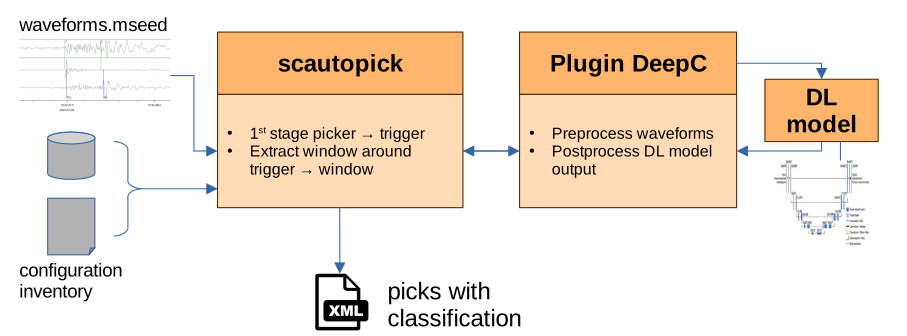
Figure 36: Example workflow with DeepC as a plugin for scautopick
3-Component Data Processing
Most DL models require 3-component waveform data to work with. In case only single-component data exits, the missing data .. channels may be generated from the existing ones by duplication and renaming of streams using scart [13].
Example duplicating and renaming streams from a file data.mseed:
dataFile=data.mseed
# extract data to be duplicated:
echo "
2000-01-01 00:00;2024-01-01 00:00;AB.*.00.HHZ > /tmp/filter.list

scart -I $dataFile -l /tmp/filter.list --stdout > /tmp/filter.mseed

# rename:
scart --rename AB.TEST1.00.HHZ:AB.TEST1.00.HHN,AB.TEST1.00.HHZ:AB.TEST1.00.HHN -I /tmp/filter.mseed --stdout > /tmp/hhn.mseed
scart --rename AB.TEST1.00.HHZ:AB.TEST1.00.HHE,AB.TEST1.00.HHZ:AB.TEST1.00.HHE -I /tmp/filter.mseed --stdout > /tmp/hhe.mseed

# merge:
cat /tmp/hhn.mseed /tmp/hhe.mseed $dataFile | scmssort -Eui > /tmp/duplicated.mseed
Note that a DL model won’t work as reliably with artificial components as with true 3-component data.
Phase reclassification
For phase refinement and classification, deepc-pr and deepc-sr
can be used as primary and as secondary picker, respectively.
Depending on whether picker.deepc.deepcPR.reclassify is set and how
confidence thresholds are defined, deepc-pr follows a decision tree to classify
a pick:
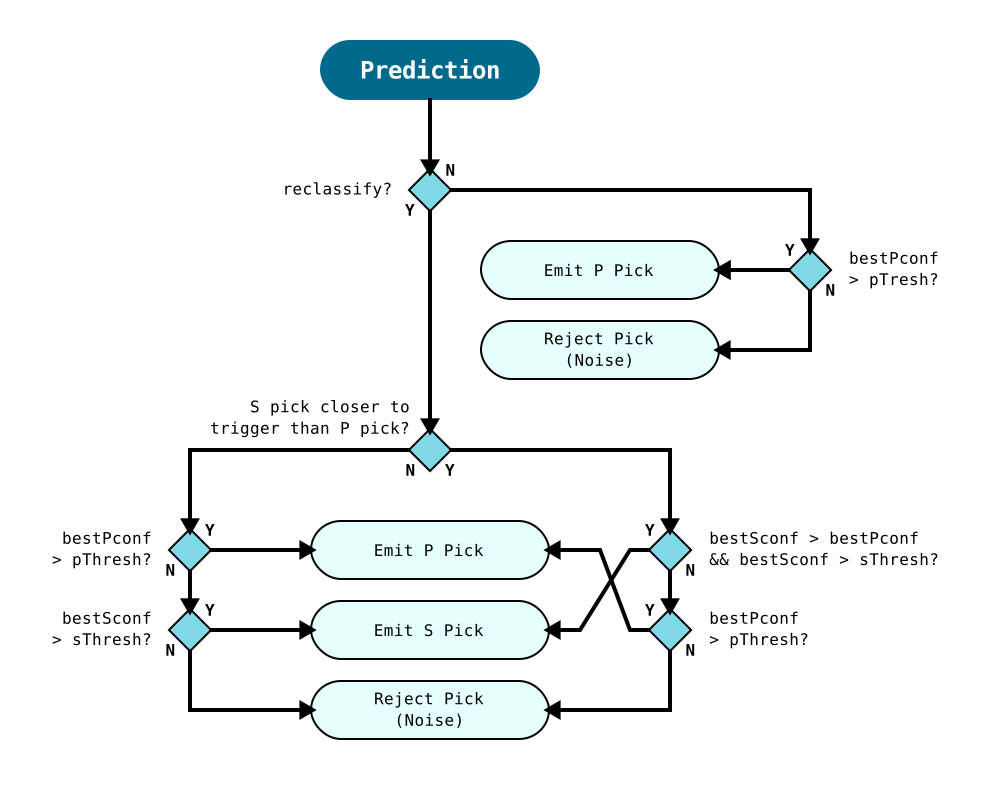
Figure 37: Pick decision tree for DeepC primary picker
In principle, deepc-sr could be run with reclassification as well, but it is currently not recommended as it would undermine the sense of the secondary picker. Therefore, deepc-sr has only two possibilities: send or not-send an S pick which is implemented by the very basic check if the first S pick after the trigger has a confidence above the given threshold.
A reclassification could take into account if the confidence for a P pick close to the potential S pick is higher. As a consequence, deepc-sr could then reject the pick. But, currently, its pick decision tree is not implemented this way, so reclassification should be turned off for deepc-sr.
Application in scolv
scolv [18] allows refining phases using the deepc-pr task. For application in scolv
Configure the deepc-pr task in global bindings following instructions in section Setup.
Configure scolv to show the confidence value of a new pick during re-picking instead of SNR:
module.trunk.global.picker.deepc.deepcPR.publishConfidenceAsSnr = true
The configuration allows inspecting the confidence and supporting the configuration of the global binding parameter
picker.deepc.deepcPR.threshold(see image below).Warning
Make this configuration only in the scolv module configuration (
scolv.cfg) and nowhere else! A configuration inglobal.cfgor in global or scautopick bindings will likely cause scautoloc [14] to fail locating.Rationale: scautoloc requires a realistic SNR for relocating, usually with
 . However,
  , hence
in a different range than SNR.
, hence
in a different range than SNR.Start scolv and load the event
Ensure that the repicker window is large enough for the configured model. The repicker parameters can be configured in the scolv module configuration. For adjustment during runtime open the menu Configure OriginLocatorView in the scolv settings (F3). For models based on PhaseNet use an interval of
 16 s. For EQTransformer use 31 s.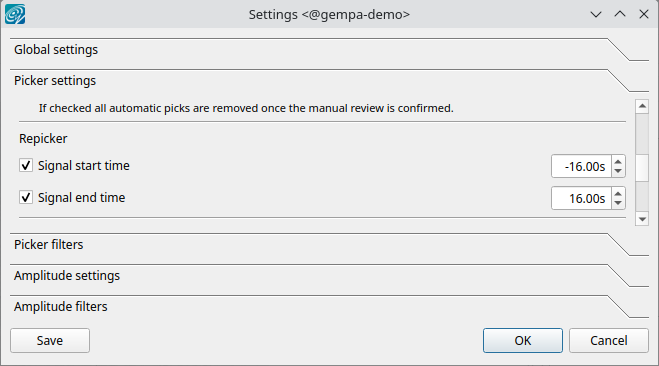
Open the phase picker window and choose deepc-pr for repicking. Other DeepC methods may also be available which can be ignored.
Activate phase picking and press R for refining the pick around the current cursor position in the upper zoom window. The refinement will be the new cursor position.
To make the pick hit Enter or Space. When the pick is successful, the confidence will be shown as the SNR value.
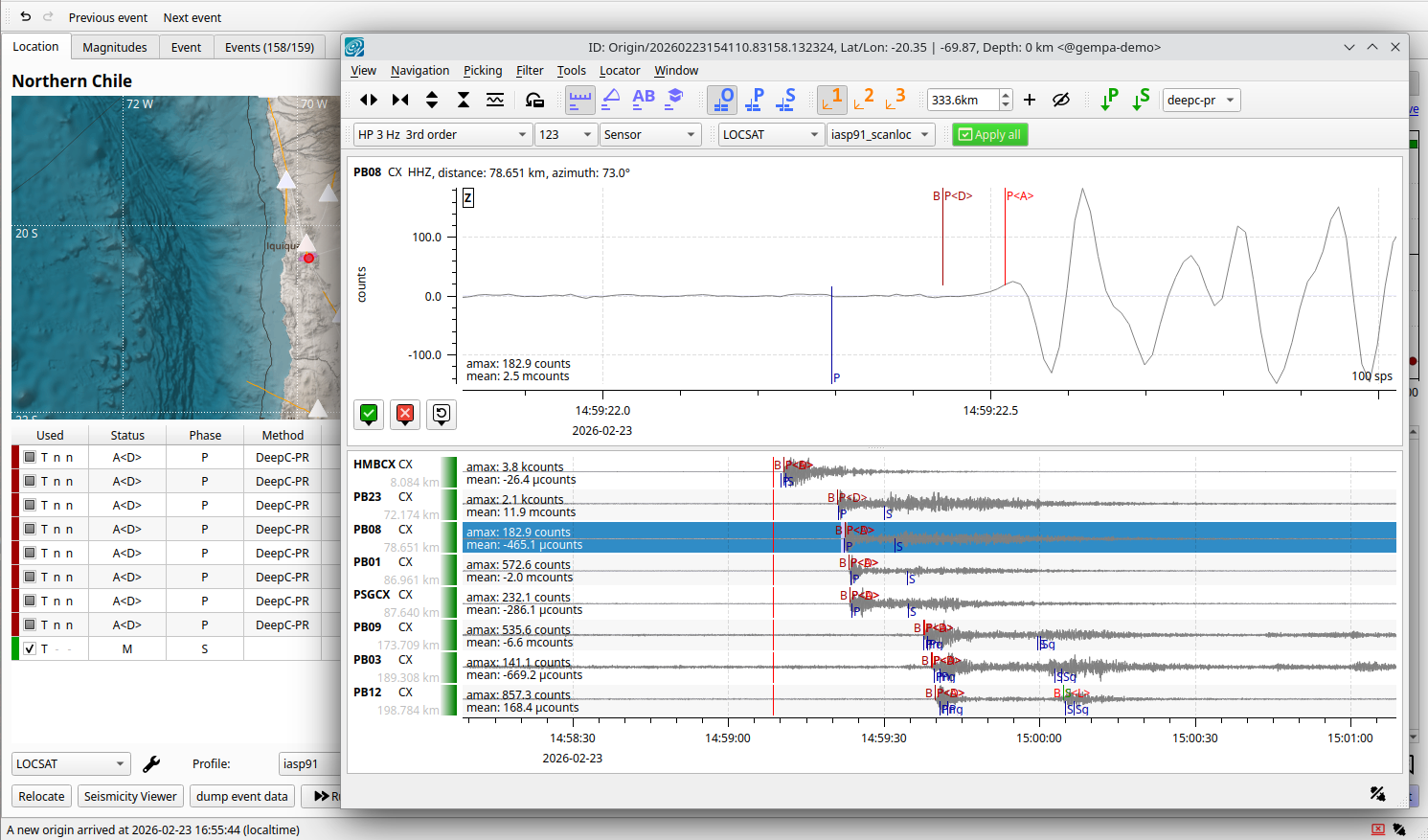
Figure 39: Picks made with deepc are identified in scolv by the method shown in the phase table and abbreviated by D along with picks on seismograms.