
autothor
Automated seismic event location by waveform coherence analysis.
Description
autothor automatically detects and locates earthquakes and other seismic sources by backprojection of seismic waveforms along travel-time curves onto a 3D source grid and subsequent waveform stacking.
Workflow
autothor scans a 3-D grid of candidate source locations continuously in fixed-length time windows, processing each node in the following order:
Grid search: the search volume is traversed node by node, first on the coarse
thor.searchgrid and then on the finethor.grid.Travel-time calculation: theoretical P- and S-wave travel times from the node to every station are computed from the configured tables (
thor.ttt.interface,thor.ttt.model) and cached.Waveform windowing: the travel times define the waveform window read at each station.
Characteristic-function generation: each window is turned into a characteristic function by the configured stacking method - an STA/LTA ratio, a deep-learning confidence curve, or an AIC onset function.
Stacking and coherence: the characteristic functions are aligned on the predicted travel times and stacked across the network; the P and S coherence are combined into a single value per node and time step.
Origin selection: grid nodes and time steps whose coherence exceeds a threshold are declared as origins.
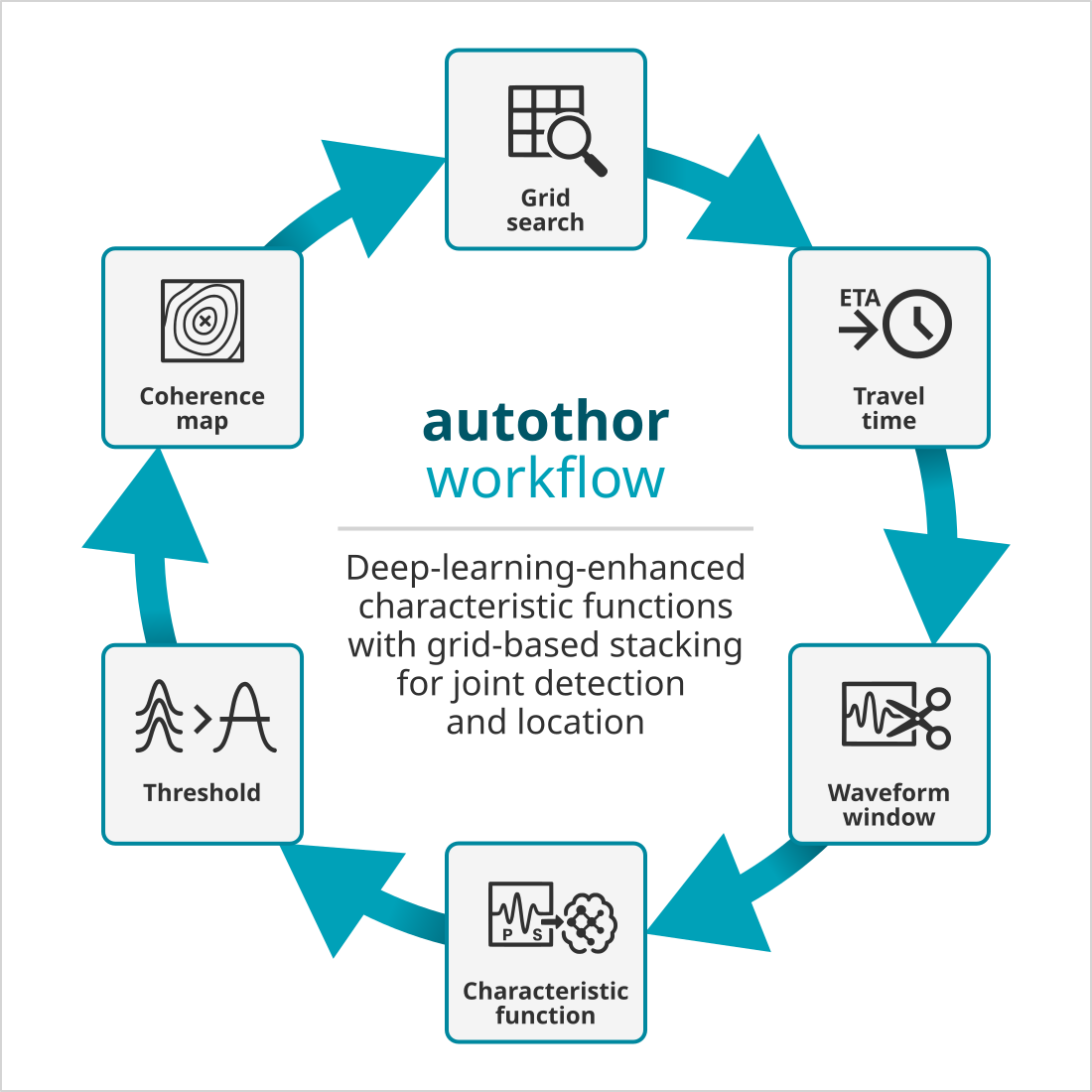
The autothor workflow. The stacking method determines how the characteristic function is formed.
Stacking methods
autothor forms, for every station, a characteristic function (CF) from the
preprocessed waveform and migrates (stacks) these CFs over the search grid. The
algorithm that turns a waveform into a CF and that picks the contributing
phases is selected by thor.stacking and is pluggable: each method is
registered by a plugin and configured under thor.stacking.<method>.
The method named by thor.stacking must be available, either built in
or loaded as a plugin via plugins. Configuration keys under one
method’s group are ignored by the others.
Method |
Plugin |
CF / picker |
Typical use |
|---|---|---|---|
|
(built in) |
STA/LTA |
General-purpose detection |
|
|
Maeda AIC P picker plus an SNR / component-energy S search |
Sparse or single-component networks; sharp onset picking |
|
|
Deep-learning phase confidence |
Where a trained model is available |
Each method is documented below.
Default (STA/LTA) stacking
The default method is built in (no plugin required) and forms each
characteristic function from a classic STA/LTA ratio - the ratio of a short-term
to a long-term average of the signal envelope. A separate STA/LTA is computed
for P and for S, so the P and S window lengths are configured independently:
thor.stacking.default.staP / thor.stacking.default.ltaP
and thor.stacking.default.staS / thor.stacking.default.ltaS
(all in seconds).
Select it (it is also the default if thor.stacking is unset):
thor.stacking = default
Trace gating and scaling
Before stacking, each STA/LTA trace can be gated and scaled:
thor.stacking.default.minimumSTALTA- the minimum acceptable STA/LTA value per phase.thor.stacking.default.scaleBySTALTA- rather than discarding a trace whose peak STA/LTA is below the minimum, scale it down (bymaxAmp / minimumSTALTA) so it contributes less to the stack.thor.stacking.default.scaleByAmplitude- scale each trace by the maximum STA/LTA across its component group (vertical or horizontal), which down-weights more distant traces. This is the STA/LTA counterpart of the deep-learningthor.stacking.dl.scaleByConfidenceand is off by default.
Horizontal S correction
thor.stacking.default.horizontalSTALTACorrection corrects the
horizontal characteristic function with respect to the vertical, suppressing the
strong P onset that leaks onto the horizontals so that the S onset stands out.
It is enabled by default and is the main mechanism by which the default
method separates S from P on three-component data.
Performance and diagnostics
thor.stacking.default.threads sets the number of threads for the
stacking grid (0 means half the reported CPU cores; a positive value is used
exactly). thor.stacking.default.dump writes the processed traces for
each time step for inspection.
AIC stacking
The aic method is provided by the thoraic plugin. It detects the P
onset on the vertical component with a Maeda Akaike Information Criterion (AIC)
picker, then searches the horizontal components for an S onset, gated by an SNR
threshold and a component-energy discriminant. The resulting onsets feed the
stack and become the picks of any declared origin.
Enable it by loading the plugin and selecting the method:
plugins = ${plugins}, thoraic

thor.stacking = aic
All parameters are read under thor.stacking.aic.*; the full list with types
and defaults is given in the configuration reference of the plugin. The
following sections describe the parameter groups and the reasoning behind them.
P onset
The P onset is found as the global minimum of the Maeda AIC function on the
vertical, restricted to the interior of the window
(thor.stacking.aic.aicMargin samples are excluded at each end where
the AIC value is unstable). The onset is accepted only if its signal-to-noise
ratio reaches thor.stacking.aic.P.minSNR; otherwise the vertical is
zeroed and given zero weight, so it does not contribute to the stack.
S onset
Anchored at the P onset, a rolling window scans the horizontals for S between
thor.stacking.aic.S.signalBegin and
thor.stacking.aic.S.signalEnd (offsets in seconds from P). The window
grows in steps of thor.stacking.aic.S.step; a candidate must reach
thor.stacking.aic.S.minSNR and persist over
thor.stacking.aic.S.minCnt consecutive qualifying windows before S is
confirmed, which suppresses single-sample spikes. The best candidate is finally
accepted only if its score (SNR weighted by the component-energy discriminant)
reaches thor.stacking.aic.S.minScore.
Widen thor.stacking.aic.S.signalEnd for larger S-P times, i.e. for
networks spanning greater epicentral distances.
Component-energy discriminant
To help separate a genuine S arrival from residual P energy on the horizontals,
a cheap per-component energy test is applied. Over a short window
(thor.stacking.aic.P.energyWindow around P,
thor.stacking.aic.S.energyWindow at the candidate S) the sum of
squares on each component forms a unit energy vector; the dissimilarity between
the P and candidate-S vectors is used as a weight in [0, 1]. Energy distributed
like the P arrival lowers the weight (probably still P); a different
distribution raises it (more likely genuine S).
Pick confidence filter
Removes weak picks from the stack and the solution.
A pick whose AIC characteristic-function peak (“confidence”) is below the
configured threshold is given zero weight and, together with
thor.removeZeroWeightArrivals, dropped from both the stack and the
origin. The thresholds are set per phase:
thor.stacking.aic.minimumPickConfidence.P and
thor.stacking.aic.minimumPickConfidence.S. A value of 0 disables the
filter for that phase.
Because P and S confidences live on very different scales (P peaks are large and well separated from noise; S peaks are small), the two thresholds are normally asymmetric - a meaningful P gate, and a low S value that only removes the weakest S without discarding the phase.
Background
The confidence filter is the main quality lever for rejecting fake origins that
would otherwise be assembled from many individually weak picks: raising
thor.stacking.aic.minimumPickConfidence.P starves such origins of
contributing stations so they fall below thor.minimumStations and are
never declared, while real events - which carry several high-confidence P picks
- are unaffected. The appropriate values are best read off the confidence
distributions of a representative playback (compare the P and S picks of
confirmed events).
Single-component and cloned-horizontal networks
On networks without true horizontal components, the horizontals are usually
synthesised from the vertical (thor.cloneHorizontalsFromVertical).
The S search then operates on cloned data, which carries no independent shear
information, so S picks are intrinsically weak. Two toggles control how S is
treated in this case:
thor.stacking.aic.skipSWhenCloned- skip the S search on stations whose horizontals are cloned. Geophysically this is the “correct” choice, but on an all-vertical network the (cloned) S picks may be needed to form solutions at all; set itfalseto keep them.thor.stacking.aic.skipSWhenNoP- skip the S search where no P onset (hence no anchor for the S window) was found.
Warning
On a single-component network, leave
thor.stacking.aic.minimumPickConfidence.S low. Real S confidences
there are small and overlap the noise, so a high S gate discards almost all S
picks. Use P as the quality gate and treat S as a supplement.
Scaling
Before stacking, each CF may be amplitude-scaled. With
thor.stacking.aic.scaling.enable the scale is adaptive (1/max,
guarded by thor.stacking.aic.scaling.minDenom and capped by
thor.stacking.aic.scaling.max so one loud station cannot dominate);
otherwise a constant thor.stacking.aic.scaling.fixed is used. An
optional, disabled-by-default S-P-distance down-weighting is available under
thor.stacking.aic.dtScaling.enable.
Example configuration (AIC)
plugins = ${plugins}, thoraic

thor {
    region = 50x50+10.1234-20.5678
    depths = 0:20
    grid   = 200x200x80
    search = 100x100x40

    filter  = "ITAPER(5)>>BW(4,0.5,8)"
    filter2 = "ITAPER(5)>>BW(4,0.5,8)"

    cloneHorizontalsFromVertical = true
    sampleRate         = 100
    signal             = 30.02
    overlap            = 0.5

    minimumCorrelation = 0.5
    minimumStations    = 6
    pickFromComponent  = true
    removeZeroWeightArrivals = true

    ttt {
        interface = LOCSAT
        model     = iasp91_scanloc
    }

    stacking = aic
    stacking {
        aic {
            aicMargin = 10

            P.minSNR      = 3
            P.energyWindow = 0.4

            S.minSNR      = 2.5
            S.minScore    = 2.0
            S.step        = 0.3
            S.minCnt      = 5
            S.signalBegin = 1.5
            S.signalEnd   = 20
            S.energyWindow = 0.6

            minimumPickConfidence.P = 100
            minimumPickConfidence.S = 10

            skipSWhenCloned = false
            skipSWhenNoP    = false
        }
    }
}
Deep-learning stacking
The dl method is provided by the thordl plugin. Instead of a hand-built
characteristic function it runs a trained deep-learning model (e.g. a
PhaseNet-type network from SeisBench) over each station’s three-component
waveform to produce continuous P and S confidence curves, which are then fed
into the same stacking machinery as the other methods.
Enable it by loading the plugin and selecting the method:
plugins = ${plugins}, thordl

thor.stacking = dl
All parameters are read under thor.stacking.dl.*; the full list with types
and defaults is given in the configuration reference of the plugin.
Model selection
The model is located by a search path and a weights name:
thor.stacking.dl.dlmodelsPath is the directory searched for models,
and thor.stacking.dl.modelWeights names the weights to load (e.g.
pnv_15s-et-0). A model providing both P and S confidence curves is required.
Confidence post-processing
The raw confidence curves can be conditioned before stacking:
thor.stacking.dl.scaleByConfidence- scale each curve by the maximum confidence across all stations for that phase (max(confidence) / globalMaxConfidence), which down-weights more distant traces. Applied separately to P and S. Deactivating this (false) is recommended.thor.stacking.dl.taperConfidence- apply a cosine taper to the ends of each curve, with the tapered fractions set bythor.stacking.dl.taperFrontandthor.stacking.dl.taperBack(each between 0 and 0.5).thor.stacking.dl.minConfidence.Pandthor.stacking.dl.minConfidence.S- lower confidence bounds used when scaling the model output, per phase. If unset, the model’s recommended value is used where present, otherwise 0.2.thor.stacking.dl.confOverlap- overlap of successive confidence segments, as a fraction (0 to 1) of the model input length.
Performance and diagnostics
thor.stacking.dl.threads sets the number of worker threads (0 uses
all available cores). thor.stacking.dl.dump writes intermediate data
for inspection.
Example configuration (DL)
plugins = ${plugins}, thordl

thor {
    # ... grid / region / filter / ttt as for any method ...

    stacking = dl
    stacking {
        dl {
            dlmodelsPath = /home/data/dlmodels/dlmodels-pick/
            modelWeights = pnv_15s-et-0

            scaleByConfidence = false
            taperConfidence   = true
            taperFront        = 0.0
            taperBack         = 0.0

            minConfidence.P = 0.2
            minConfidence.S = 0.2

            confOverlap = 0.067

            threads = 0
        }
    }
}
Note
The dl method needs a trained model present under
thor.stacking.dl.dlmodelsPath. Where no suitable model is
available, the AIC method is a lightweight
alternative that needs no model.
GPU acceleration
The stacking grid can be migrated on the GPU instead of the CPU, independent of
which stacking method forms the characteristic functions. Enable it with
thor.stacking.gpu.enable. thor.stacking.gpu.numWorkers
selects how many GPUs to use (0 means all available NVIDIA GPUs, falling back to
CPU processing if none are found), and thor.stacking.gpu.precision
chooses single- or double-precision arithmetic.
Examples
Because the grid search resolves source depth directly, the located origins can be inspected in three dimensions (Figure: located hypocenters). Depth structure that is hard to see in single-station picking - for example separate shallow and deeper clusters - is recovered from the coherence of the network stack.
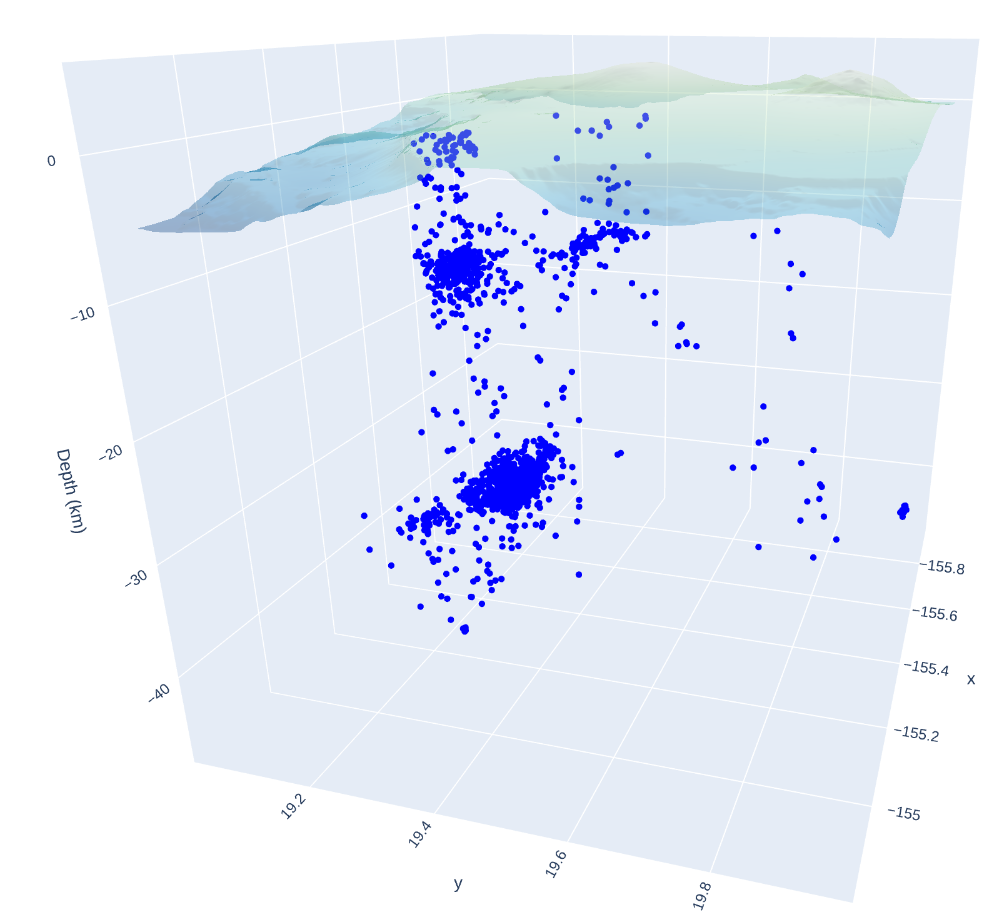
Example autothor result: located hypocenters shown in three dimensions (longitude, latitude and depth) beneath the topography. The catalogue resolves distinct depth populations rather than a single layer.
Module Configuration
etc/defaults/global.cfgetc/defaults/autothor.cfgetc/global.cfgetc/autothor.cfg~/.seiscomp/global.cfg~/.seiscomp/autothor.cfgautothor inherits global options.
Note
Modules/plugins may require a license file. The default path to license
files is @DATADIR@/licenses/ which can be overridden by global
configuration of the parameter gempa.licensePath. Example:
gempa.licensePath = @CONFIGDIR@/licenses
- thor.region
Type: string
The processing region which is interpolated in the grid. The format is [lon_width_in_km]x[lat_width_in_km]+/-[lon_in_degrees]+/-[lat_in_degrees].
- thor.rotation
Default:
0Unit: deg
Type: double
The counter clockwise rotation angle of the region around the min_lat/min_lon coordinate.
- thor.depths
Unit: km:km
Type: string
The depth range to search. The format is [min_depth_in_km]:[max_depth_in_km].
- thor.grid
Default:
100x100x10Type: string
The processing grid in [nodes_x]x[nodes_y]x[nodes_z]. The grid does not include the corresponding maximum values of each dimension. The actual cell size in one dimension is length / nodes.
- thor.search
Default:
10x10x2Type: string
The initial search grid. This grid is a coarser grid than the final grid. It is used to speed up computation by not evaluation the full space. After finding the maximum in this inital search grid, the cell and its direct neighbors are evaluated with the final grid cellspacing.
- thor.stations
Type: list:string
A list of stations to be used. The location code and channel code is read from the bindings detecLocid and detecStream. If the stations list is empty, then bindings are evaluated and all stations are being used which are enabled for thor.
- thor.inventoryReferenceTime
Type: time
The metadata reference time for fetching station configurations from inventory.
- thor.filter
Default:
RMHP(1)>>DIFFType: string
A processing filter which is applied to each channel before stacking takes place.
- thor.filter2
Type: string
A secondary processing filter which is applied to each channel before stacking takes place. This secondary filter will be applied to the horizontal components if provided. Otherwise the primary filter will be used.
- thor.cloneHorizontalsFromVertical
Default:
falseType: boolean
If a single component station should be used, then this parameter decided whether the single vertical component will be cloned to the missing two horizontal components (true) or if the application will be terminated due to missing metadata (false).
- thor.sampleRate
Default:
100Unit: sps
Type: double
The common sample rate to be used. Data which is not sampled with another rate will be resampled to match this value.
- thor.signal
Default:
5Unit: s
Type: double
The length of the signal window.
- thor.maxWindow
Default:
0Unit: s
Type: double
The effective data window is computed as signal plus maximum expected time shift. In order to limit this effective data window this value can be used. If larger than zero, then it will be taken as the maximum length of the data window. For samples which are required during stacking but are not available in the data window, zeros will be used. Note that it can’t be less than signal.
- thor.overlap
Default:
0.5Type: double
The overlap of the signal window when forwarding to another time window. The effective stepping length is signal * (1-overlap).
- thor.dump
Default:
falseType: boolean
Dump each solution as graphical PNG image and Surfer grid files in local directory. The files are named are controlled by "thor.useOriginID".
- thor.useOriginID
Default:
falseType: boolean
Use the public ID of the related origin for creating the names of the dumped solution files.
True: "grid_[publicID].[png|grd]"
Default: "grid_[step].[png|grd]"
- thor.minimumCorrelation
Default:
0.25Type: double
The minimum correlation value to accept a solution. This value should be between 0 and 1.
- thor.minimumStations
Default:
0Type: integer
The minimum number of stations which must contribute to a solution.
- thor.stacking
Default:
defaultType: string
The stacking processor to be applied. If no additional plugin has been loaded, then only the "default" processor is available.
- thor.cacheDirectory
Default:
@CONFIGDIR@/cache/thorType: directory
The directory where the travel time grids of the stations are saved.
- thor.pickFromComponent
Default:
falseType: boolean
Whether to set the pick time from the maximum index of the stack function (false) or from the maximum of each contributing component (true).
- thor.removeZeroWeightArrivals
Default:
falseType: boolean
Remove arrivals having a weight of 0.
- thor.pickUncertainty
Default:
falseType: boolean
Whether to set the pick time uncertainty to the used time window or not.
Note
thor.ttt.* Configuration options for the travel time computation.
- thor.ttt.interface
Default:
LOCSATType: string
The travel time table interface used to compute travel times from each grid node to a station.
- thor.ttt.model
Default:
iasp91Type: string
Values:
iasp91,tabThe travel time table model used to compute travel times from each grid node to a station.
- thor.stacking.gpu.enable
Default:
falseType: boolean
Whether to run the stacking algorithm on GPU.
- thor.stacking.gpu.numWorkers
Default:
0Type: integer
The number of workers to use when computing the stacking grid. 0 means all available NVIDIA GPUs in the system. Falls back to CPU processing if set to 0 and no compatible GPUs are found.
- thor.stacking.gpu.precision
Default:
doubleType: string
Values:
single,doubleWhether to use single or double precision arithmetic in GPU processing.
Note
thor.stacking.default.* Configuration options for the default stacking algorithm.
- thor.stacking.default.staP
Default:
0Unit: s
Type: double
The length of the P short-term window in seconds for STALTA.
- thor.stacking.default.ltaP
Default:
0Unit: s
Type: double
The length of the P long-term window in seconds for STALTA.
- thor.stacking.default.staS
Default:
0Unit: s
Type: double
The length of the S short-term window in seconds for STALTA.
- thor.stacking.default.ltaS
Default:
0Unit: s
Type: double
The length of the S long-term window in seconds for STALTA.
- thor.stacking.default.minimumSTALTA
Default:
0Type: double
The minimum STALTA value for each phase.
- thor.stacking.default.scaleBySTALTA
Default:
trueType: boolean
Whether to scale traces by STALTA or discard them. If enabled, then each traces will be scaled down if its maximum STALTA value is below the minimum configured STALTA value. The scaling factor will be maxAmp / minimumSTALTA.
- thor.stacking.default.scaleByAmplitude
Default:
falseType: boolean
Whether to scale by the maximum amplitude of all components among the vertical or horizontal group. If enabled, then the maximum value of all vertical STALTA traces is used to scale each vertical STALTA function by maxSTALTA(trace) / globalMaxSTALTA. The same applies for the horizontal components. This will downweight traces in farther distances.
- thor.stacking.default.horizontalSTALTACorrection
Default:
trueType: boolean
If enabled, then the characteristic function formed by the horizontals will be corrected w.r.t to the characteristic function of the vertical component to suppress the strong P onsets on the horizontals and to bring out the characteristic function of the S phase.
- thor.stacking.default.threads
Default:
0Type: integer
The number of threads to use when computing the stacking grid. 0 means half the number of reported CPU cores. A value greater than 0 will use exactly this number of threads.
- thor.stacking.default.dump
Default:
falseType: boolean
Whether to dump the processed traces for each time step or not.
Bindings Parameters
- thorEnable
Default:
falseType: boolean
Enables/disables processing with THOR.
Command-Line Options
Generic
- -h, --help
Show help message.
- -V, --version
Show version information.
- --config-file file
The alternative module configuration file. When this option is used, the module configuration is only read from the given file and no other configuration stage is considered. Therefore, all configuration including the definition of plugins must be contained in that file or given along with other command-line options such as --plugins.
- --plugins arg
Load given plugins.
- -D, --daemon
Run as daemon. This means the application will fork itself and doesn’t need to be started with &.
- --auto-shutdown arg
Enable/disable self-shutdown because a master module shutdown. This only works when messaging is enabled and the master module sends a shutdown message (enabled with --start-stop-msg for the master module).
- --shutdown-master-module arg
Set the name of the master-module used for auto-shutdown. This is the application name of the module actually started. If symlinks are used, then it is the name of the symlinked application.
- --shutdown-master-username arg
Set the name of the master-username of the messaging used for auto-shutdown. If "shutdown-master-module" is given as well, this parameter is ignored.
Verbosity
- --verbosity arg
Verbosity level [0..4]. 0:quiet, 1:error, 2:warning, 3:info, 4:debug.
- -v, --v
Increase verbosity level (may be repeated, e.g., -vv).
- -q, --quiet
Quiet mode: no logging output.
- --component arg
Limit the logging to a certain component. This option can be given more than once.
- -s, --syslog
Use syslog logging backend. The output usually goes to /var/lib/messages.
- -l, --lockfile arg
Path to lock file.
- --console arg
Send log output to stdout.
- --debug
Execute in debug mode. Equivalent to --verbosity=4 --console=1 .
- --log-file arg
Use alternative log file.
Messaging
- -u, --user arg
Overrides configuration parameter
connection.username.
- -H, --host arg
Overrides configuration parameter
connection.server.
- -t, --timeout arg
Overrides configuration parameter
connection.timeout.
- -g, --primary-group arg
Overrides configuration parameter
connection.primaryGroup.
- -S, --subscribe-group arg
A group to subscribe to. This option can be given more than once.
- --content-type arg
Overrides configuration parameter
connection.contentType.Default:
binary
- --start-stop-msg arg
Default:
0Set sending of a start and a stop message.
Database
- --db-driver-list
List all supported database drivers.
- -d, --database arg
The database connection string, format: service://user:pwd@host/database. "service" is the name of the database driver which can be queried with "--db-driver-list".
- --config-module arg
The config module to use.
- --inventory-db arg
Load the inventory from the given database or file, format: [service://]location .
Records
- --record-driver-list
List all supported record stream drivers.
- -I, --record-url arg
The RecordStream source URL. Format: [service://]location[#type]. "service" is the name of the RecordStream driver which can be queried with "--record-driver-list". If "service" is not given, "file://" is used and simply the name of a miniSEED file can be given.
- --record-file arg
Specify a file as record source.
- --record-type arg
Specify a type for the records being read.
Mode
- --offline
Do not connect to messaging
- --ep arg
Implies offline and outputs all results as a single event parameters XML document to stdout
Offline
- -E, --eventID arg
Define an event ID to be relocated. If both an origin and event IDis given, then the origin ID has precedence.
- -O, --originID arg
Define an origin ID to be relocated. If both an origin and event IDis given, then the origin ID has precedence.