
dlpick
Phase detection and picking on waveforms.
Description
DLPick is a highly configurable SeisComP StreamApplication client that reads waveforms from recordstream and outputs picks, processed by Deep Learning (DL) models, that were created and trained using the SeisBench framework.
Installation
Install DLPick using gsm:
$ gsm install dlpick
This installs three packages:
dlpick - this application
dlbase - dependency package for deep learning applications
dlmodels-pick - DL models, installed to /home/data/dlmodels, by default
dlbase-extend - CUDA dependencies, can be omitted if already present on your system
dltools - only necessary if you plan to use your own pretrained model(s)
Further dependencies: Go to your $SEISCOMP_ROOT/share/deps, descend into the subpath that matches your distribution and execute the shell script.
For example, if you are working on a Debian 13 system and you’ve installed SeisComP at /home/sysop/seiscomp:
$ seiscomp install-deps dlpick
- or -
$ sh /home/sysop/seiscomp/share/deps/debian/13/
Workflow
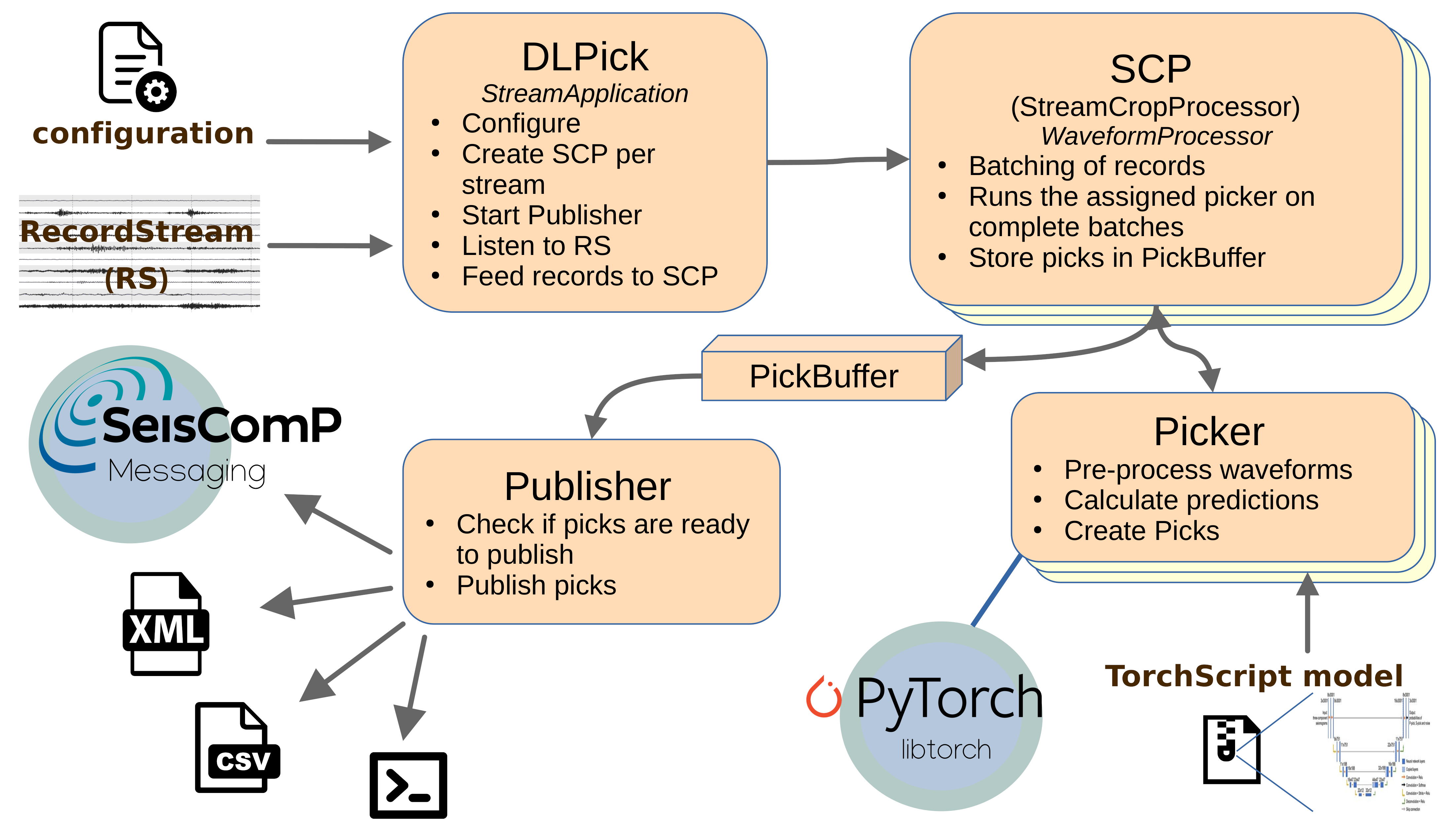
Figure 1: simplified architecture of DLPick
General information
Like any other SeisComP StreamApplication client, DLPick can read from any RecordStream, attach to a database and messaging. This also means, DLPick can operate in both real-time and non-real-time mode. There is a module configuration for DLPick and you can also override most of the parameters using DLPick binding profiles for your stations.
DLPick creates P and S picks depending on the DL model used. It also calculates the SNR and provides it as amplitude. These parameters can be sent to the messaging or used in offline playbacks in your pipeline, e.g., as input for further processing by scautoloc or scanloc.
DL models were trained on big datasets and usually work best on data that is similar to their training data. They generate confidence curves that are the lower the more unfamiliar the data is. Keep that in mind when setting up which model to use, which confidence thresholds, overlapping ratio and upstream filters. DL models don’t necessarily work “out-of-the-box” but might need a fair amount of configurational tuning like conventional pickers.
One major difference to, e.g., the STA/LTA-AIC picker chain in scautopick is that, in general, DL models need three components. Therefore DLPick will try to find a three-component based orthogonal system. Since this might not always be available, DLPick allows also to work around these restrictions.
DL models use fixed time windows as input. The input data is cut into time windows of the model’s needed length. To improve prediction quality, DLPick allows these models to overlap by a ratio of your flavour.
Configuration
There are three levels of configuration. The most specific one is a binding profile attached to a set of stations. And this is also the recommended way of configuring DLPick.
The module configuration serves as fallback for missing values in bindings or for stations without DLPick bindings. Some parameters, like general behavior should be configured here (for example, if models should be moved to the GPU), while rather data-specific parameters as model and thresholds should be configured in the bindings.
Commandline arguments surpass all other configurations. This also means that stations without DLPick but with global bindings (valid detecStream and detecLocid parameters) will be processed just by telling DLPick which model to use.
Real-time mode
Make sure to have the necessary seiscomp modules running. For example, if you provide waveforms via seedlink:
$ seiscomp start scmaster seedlink
You can run DLPick as any other seiscomp module in scconfig or on the commandline:
$ seiscomp start dlpick
or - to for debugging purposes:
$ dlpick --debug
Without any arguments (or with –debug flag only), DLPick will use the local configuration, connect to the local database and messaging.
If you already have global bindings attached to your streams providing detecStream and detecLocid, DLPick might use its default settings to process streams and send resulting picks to the messaging. However, since there is no default model, DLPick doesn’t know what to do and will ignore these stations unless you define it in the module configuration or on the commandline, as shown in the next section.
The DL model
In the module config and on the commandline, you can define a default DL model that is run on all stations even if they don’t have a DLPick binding. Note that this might not be what you want on a production system when you wish to restrict DL picks to a certain set of stations. For an offline playback, on the other hand, this configuration is very convenient.
As an example DL model you can use PhaseNet with its original weights. This model needs 30s input of raw three-component data with sample rate of 100 Hz. The app takes care of resampling and all pre-processing steps that are specific to the model.
Other models can be used, currently only EQTransformer and PhaseNet architectures are supported. The more flexible variant of PhaseNet, VariableLengthPhaseNet, is supported as well, although there are not many weights for it. Show a list of available models, that shipped with your installation of dlmodels-pick:
$ dlpick --print-models
Use the Identifier as name to define which model to load.
Hint
For details on models and the data that they were trained on, take a look into the SeisBench docs. There you will find most of the datasets that were printed with –print-models in the Datasets column.
As a practical advise, you should try out different models. For local seismicity, “instance” weights are a good choice.
$ dlpick --model-weights eqtransformer-instance
Hint
Note that the model and the weights should be written in lower-case. It’s possible to use abbreviations for the weights,
as well. You could also type --model-weights eq-in. These abbreviations are stored in the file
dlmodels_maps.json, located at your dlmodels installation directory. The command “dlpick –print-models” also
shows the short version in the column “Identifier”, which is much more convenient for complex model names.
In contrast to PhaseNet, the EQTransformer architecture needs 60s of input data.
In the configuration, use the parameter modelWeights to set or change the model applied to all stations
without DLPick bindings specifying the model.
For production use, prefer the same-named binding parameter!
Note
The parameter name “model-weights”/”modelWeights” was chosen to reflect the dualism of the term “model”. On the one hand, “model” describes the architecture / the computation graph of the neural net. On the other hand, it’s the model’s weight parameters which are fit during training. But each training can change the model’s behavior completely which justifies speaking of different models even though only the weights are different. Our parameter names combine both terms to point out that you are using both, a model and its weights.
Output
Without any further configuration, DLPick will send picks to the messaging. But there are more ways to publish picks:
Write to SCML files:
output.xml
Picks (and amplitudes if enabled) are gathered as event parameters. When the number of picks exceeds a certain threshold a file is created. Succeeding files are enumerated. When finishing the app, all created files are merged into one. The path to this will be printed on the commandline.
Write to CSV files:
output.csv
Pick information condensed into simplest CSV format. Flushed to files and merged following the same principles as above.
Print to terminal:
output.stdout
Picks are printed on the commandline
These options can be combined and work well together with the messaging.
If you don’t want to publish picks to the messaging, turn on output.offline.
On the other hand, it is not necessary to explicitly activate the messaging,
but you can define a specific server connection with the global parameter connection.server
or on the commandline:
$ dlpick -H localhost
Write SCML to stdout:
output.ep
This option is the best used for offline playbacks. It turns off the messaging
and forbids the simultaneous usage of output.stdout.
Picks are output as event parameters in SCML format in the terminal on stdout.
The output can then be redirected to a file.
Parameters output.ep, output.xml , output.csv and output.stdout
can be also be overridden with the same-named commandline arguments.
Example: offline playback
As mentioned, DLPick can process miniSEED files and work in offline playback mode completely:
$ dlpick -I waveforms.mseed --inventory-db inventory.xml --config-db config.xml --config-file dlpick.cfg \
    --ep --batch-size 512 --gpu --stdout
This command disconnects from the database as well as from the messaging. It uses file-based configurations.
A high batch size and gpu usage will speed-up the processing. While running, DLPick outputs concise
pick lines in the terminal (output.stdout).
Confidence thresholds
The applied DL model outputs a scores that can be considered as the model’s confidence about a P or an S pick for each data sample. This enables us to use confidence thresholds to restrict or relax the number (and quality) of picks. The default thresholds are low (0.1) which might be too low for some models, resulting in many fake picks. But almost all models also have recommended thresholds that override the app’s defaults and will be used when you leave the corresponding threshold parameters empty.
To get a feeling for thresholds per model, you need to try out some values yourself.
$ dlpick --p-threshold 0.3 --s-threshold 0.3
In the module configuration, you can set the P and the S thresholds:
However, it’s strongly recommended to keep these parameters coherent with the chosen model and therefore you should prefer the same-named binding parameters.
Overlapping and pick reduction
It is advisable to process waveforms with overlapping time windows. This way the model gets more chances to find phase onsets that are close to the window’s borders. But this also means more picks are generated. To rise to this challenge, DLPick uses a reduction algorithm that searches for very dense picks and selects only those with the highest confidence within a certain window.
An overlapping of 90% would mean that the data is cut like this:
|0,1,2,3,4,5,6,7,8,9|
  |1,2,3,4,5,6,7,8,9,10|
      |3,4,5,6,7,8,9,10,11|
        |4,5,6,7,8,9,10,11,12|
        :         :          : // etc
You can set the value on the commandline like this:
$ dlpick --ol-ratio 0.9
The corresponding parameter in the module config as well as in the bindings is called input.traceWindowOlRatio.
Keep in mind that high overlapping ratios come at the expense of performance! Picking delay might be noticeable on older systems with a many stations. You can still use overlapping but set it to a rather low value like 50% (0.5).
Per default, the reduction algorithm ensures picks have a distance of at least 1s to each other.
If you think, for example, this interval is too narrow, you can change it by tuning parameter
picks.reduction.clusterAlgo.clusterSize which is currently only available in bindings or
by using this trick above on the commandline:
$ dlpick --model-weights eqtransformer-in --ol-ratio 0.9 \
   --module.trunk.dlpick.dlpick.picks.reduction.clusterAlgo.clusterSize=3.5
Now that the cluster size is larger, within a 3.5 seconds window only one–the most confident pick–will survive.
Performance tweaks
Batching
To improve performance, waveforms should be processed in a batch and, if possible on the GPU. Per default, the batch size is already 32. But this might lead to longer waiting times. If you experience this as a problem, set the batch-size to 1, to process each data window, instantly.
Tune DLPick using an offline playback:
$ time dlpick --batch-size 1 -I waveforms.mseed --offline --stdout
From there, double the value and check the time difference until you find the sweet spot.
Batches are packed for each Picker configuration. This means, if multiple streams are processed with the same configuration, only one Picker is in charge. Each picker will try to fill a batch of the specifically configured size before processing the data. If you don’t use bindings, there will be one Picker configuration only and the batch size will apply to all processed data.
In the module configuration and in the bindings, the parameter is called batchSize.
GPU
If your machine has a CUDA GPU, you should use it to accelerate predictions, together with appropriate batch sizes:
$ dlpick --gpu --batch-size 128
However, this will be more of advantage in offline mode.
Hint
Predictions run on the GPU are likely to slightly differ from those run on the CPU. This is expected behavior as the CUDA libraries use other floating point arithmetic algorithms than their CPU counterparts. While both modes calculate the same neural net, the order of operations might differ and rounding errors sum up differently.
You will find the parameter gpu in the module configuration but not as a binding parameter.
Phase hints
Per default, DLPick puts a ‘d’ in front of the phase name and appends the confidence as percentage:
"dP (93.3%)"
"dS (10.1%)"
Although this is very convenient for isolated offline playbacks, to quickly see confidences of deep learning picks, for your pipeline, you are going to need clean phase hints! So, change these two parameters to empty strings:
$ dlpick --phase-prefix "" --phase-postfix ""
The corresponding module configuration parameters are: phaseHint.phasePrefix and
phaseHint.phasePostfix.
Custom models
Custom models can easily be added, after they have been converted by gempa into the correct format. To use them, first install dltools. Let’s say your new model is an EQTransformer trained on your own dataset called “TestDataset”. Gempa DL models follow a specific naming convention that refers to the model, the trained dataset and an optional version. To keep names simple and short there are abbreviations for models and dataset. They are stored with your dlmodels installation in a file called dlmodels_maps.json. To make your model available for DLPick or other gempa DL modules and plugins, you need to edit this file, as well, which is easily done by dltools.
The following line adds your dataset name with the abbreviation “tds” (abbreviations are always 2 or 3 letters) to the default file path /home/data/dlmodels/dlmodels-pick/dlmodels_maps.json:
$ dltools-add-ds TestDataset tds
The next step is to move your model to the custom directory and to link it to the standard directory and to merge your dlmodels_maps.jons files:
$ mv eq-tds.json eq-tds.cpu.pt eq-tds.cuda.pt /home/data/dlmodels/custom  # default directory for custom models
$ dltools-sync-models /home/data/dlmodels  # parent directory for picker, classifier and models
This adds the config file (.json) and the two checkpoints (for CPU and for CUDA) to the correct location and links them into /home/data/dlmodels/dlmodels-pick. The file /home/data/dlmodels/dlmodels-pick/dlmodels_maps.json will have all necessary information on your dataset, which allows for parsing your file name correctly, without error message:
“eq”-> “EQTransformer”
“tds” -> “TestDataset”
Note
You are not forced to use this file structure. dltools-sync-models needs a parent directory for pickers and classifiers, but the custom models directory can be provided with parameter –customPath /path/to/custom/models. In case you don’t have subdirectories in your parent directory, add –flat.
Even dltools-add-ds can be advised to read and write to specific subdirectories instead of assuming the defaults: dltools-add-ds TestDataset tds –input /path/to/custom/models/dlmodels_maps.json
Confirm the changes by listing all available models:
$ dlpick --print-models

List of available models:
-------------------------------------------------------------------------------------------------------
  Identifier          | Architecture      | Attrib. | Datasets                         | Version | C | G
-------------------------------------------------------------------------------------------------------
eq-et                 | EQTransformer     |         | ETHZ                             |         | x | x
   :                        :                          :                                           :   :
eq-tds                | EQTransformer     |         | TestDataset                      |         | x | x
   :                        :                          :                                           :   :
The list view is shortened here but should look similar. From now on, eq-tds can be used as value for DLPick parameter modelWeights.
Concepts
Reduction algorithm
With the overlapping of prediction windows, picks of two overlapping windows might refer to the same onset although might not always be exactly at the same time. Either way, this behavior produces much more picks than acceptable. Two algorithms are here to improve this situation.
Simple Reduction Algorithm
Whether two picks define the same phase onset, is currently controlled by an interval for the simple reduction algorithm. This means if two picks lie in the same interval, they will be merged and only the more confident one “survives”. The simple reduction algorithm iterates through the ordered list of picks (one direction: from past to future) and looks ahead for the interval time. The next found pick will be merged with the first one, and so on. The algorithm will be applied a second time, because the merged pick will be skipped in the first run for the next comparison, thus, it could be too dense to a neighboring pick no matter if the latter was merged as well. This two-passes strategy tickles the issue of progressively moving picks: Let’s say a bunch picks lie very close to each other with increasing confidence, but the first and the second halves of picks refer to actually different onsets. If we would use a one-pass strategy and use the last merged pick as starting point for the next comparison then we could end up in a situation where no pick for the first event is left.
Pick Cluster Reduction Algorithm (Default)
Instead of linearly merging picks, this algorithm clusters close picks based on given distance. The algorithm works in 4 steps: 1. For each pick a cluster is formed adding all neighboring picks that are close. 2. Each pick is assigned to the nearest cluster based on central distance. The created clusters can overlap. 3. Merge all overlapping clusters 4. Check all clusters that are either before the “safe-time” or whose number of picks exceed the given threshold. If one of the checks in step 4. is valid, the picks in the interval are reduced to the most confident one. The application keeps track of intervals that have already been processed. If a pick arrives later whose time falls into an interval that was already processed, it is ignored.
Module Configuration
etc/defaults/global.cfgetc/defaults/dlpick.cfgetc/global.cfgetc/dlpick.cfg~/.seiscomp/global.cfg~/.seiscomp/dlpick.cfgdlpick inherits global options.
Note
Modules/plugins may require a license file. The default path to license
files is @DATADIR@/licenses/ which can be overridden by global
configuration of the parameter gempa.licensePath. Example:
gempa.licensePath = @CONFIGDIR@/licenses
- modelsPath
Default:
/home/data/dlmodels/dlmodels-pickType: path
Search path for Deep Learning models. This path is also used to look up the file "dlmodels_maps.json" holding additional information on the available models.
- modelWeights
Type: string
Name of the Deep Learning model to use. The name is a combination of the architecture, the name of the trained weights and, in some cases, a version number. Example: ‘phasenet-instance’ or its short identifier ‘pn-in’ loads the Deep Learning model PhaseNet with weights trained on the Instance dataset.
- gpu
Type: boolean
If set, model and data will work on the GPU if cuda is available on the machine else on CPU.
Note
streams.*
- streams.before
Default:
300Unit: s
Type: int
Defines the time in seconds to start picking on waveforms before current time.
- streams.referenceTime
Type: string
The time used to look up the correct inventory epoch. Set this time to process waveforms for which the inventory at current time is invalid. If not defined, current UTC time is used.
- streams.relaxReferenceTime
Type: boolean
If set, parameter
streams.referenceTimeis treated like a recommendation but not as a hard condition to add streams.
- streams.missingLocationStrategy
Default:
SKIPType: string
Values:
SKIP,ERROR,USE_ANY,FAKE,USE_ANY_OR_FAKEDecide which strategy to pursue when a location could not be found in the inventory. SKIP: station won’t be added ERROR: app aborts instantly USE_ANY: use any other location found in the inventory FAKE: create a dummy location USE_ANY_OR_FAKE: try to find any other location - if not possible, create a dummy
- streams.cloneHorizontalsFromVertical
Default:
falseType: boolean
If a single component station should be used, then this parameter decided whether the single vertical component will be cloned to the missing two horizontal components (true) or if the application will be terminated due to missing metadata (false).
- input.traceWindowOlRatio
Default:
0.0Type: double
Ratio defining how much trace windows are overlapping each other.
- input.batchSize
Type: int
Number of data windows to process per picker at the same time.
- input.minPrefDataRatio
Default:
1.33Type: double
(Surplus) ratio of data in relation to the actually necessary (model-defined) length that the app shall wait for before passing the data to the inference step. Having surplus data allows finding component overlaps without padding missing data with zeros.
- input.maxGap
Default:
0.5Unit: s
Type: double
(Not implemented!) Maximum gap in seconds that is tolerated for records to be considered as continuous. Note that the gap will be linearly interpolated.
- input.filter
Type: string
The filter to apply on the data before it is sent to the picker. This parameter overrides any model or station filter parameter.
- input.blindingSamples
Default:
0Type: ints
Count of samples at the start and in the end of a model’s prediction to ignore. DLPick won’t try to look for picks in these edge regions. Value is intended to be a pair of integers for start and end region, but when setting a single number, the same value will be applied for start and end regions.
- picks.minGatherPicksBeforeFlush
Default:
10Type: int
This parameter sets the number of picks that must be gathered before publishing.
Details: Minimum-size criterion for flushing a pick buffer. When the publisher process tries to pop picks from the pick buffers, this criterion is tested as well as the timeout. If one of them is true, those picks considered as safe-to-flush will be sent to the output sinks.
- picks.minTimeBeforeFlush
Default:
10.0Unit: s
Type: double
This parameter sets the timeout for gathering picks until they are published. After publishing, the timer starts over again with the next staging of picks, in a buffer.
Details: Time criterion for flushing a pick buffer. When the publisher process tries to pop picks from the pick buffers, this criterion is tested as well as the minimum picks number. If one of them is true, those picks considered as safe-to-flush will be sent to the output sinks.
- picks.phaseHint.prefix
Default:
dType: string
Prefix that will be put in front of the phase hint.
- picks.phaseHint.postfix
Type: string
Suffix for the phaseHint string of the pick. This string is interpolated like a Python format string. You can use "$c" as placeholder for the pick confidence. Example: "({$c:.1%})" would result in "(56.0%)" as a suffix for a pick with confidence 0.56012345, whereas "{$c}" would simply add the confidence to the phase string: "0.56012345". Note that "$c" needs to be inside a curly-brace context to work as a variable.
- picks.phaseHint.phaseMap
Type: string
Rename phase hints. E.g., to rename P to Is and S to It: "P:Is,S:It"
- picks.thresholds.P
Default:
0.1Type: double
Threshold defining the minimum confidence of for a P pick.
- picks.thresholds.S
Default:
0.1Type: double
Threshold defining the minimum confidence of for an S pick.
- picks.thresholds.PUncertain
Type: double
If set, adds additional picks with a lower threshold, marking them with the prefix ‘u’. Picks above the normal
picks.thresholds.Pare not touched. This value can be overridden by the same-named bindings’ config parameter for the corresponding set of stations.
- picks.thresholds.SUncertain
Type: double
If set, adds additional picks with a lower threshold, marking them with the prefix ‘u’. Picks above the normal
picks.thresholds.Sare not touched. This value can be overridden by the same-named bindings’ config parameter for the corresponding set of stations.
- picks.thresholds.snr
Type: double
A pick whose SNR is up to this threshold won’t be published. Won’t be applied if set to 0.
- picks.reduction.algorithm
Default:
ClusterType: string
Values:
Cluster,SimpleThe picks reduction algorithm to use.
Choose "Simple" for the "Simple Reduction" algorithm. This one is applied at some point on staged picks and reduces too dense picks in a linear fashion.
Choose "Cluster" for the "Cluster Reduction" algorithm. This one is applied at some point on the staged picks. Picks in "safe" clusters lying before the "safe time" (i.e., when no more new picks are expected to join the cluster) are reduced instantly, while the others remain "staged". This algorithm allows the option
picks.reduction.clusterAlgo.safeMinPickCountto define a threshold of pick count for a cluster to be reduced even before the "safe time" criterion hits.
- picks.reduction.minGatherPicksBeforeReduce
Default:
10Type: int
This parameter sets the number of picks that must be staged before the reduction algorithm is applied to them.
Details: Minimum-size criterion for applying the reduction algorithm to a pick buffer. When pushing to or popping from a pick buffer, this criterion is tested as well as the timeout. If one of them is true, the reduction will be applied. (There is a pick buffer for each stream.)
- picks.reduction.minTimeBeforeReduce
Default:
10.0Unit: s
Type: double
This parameter sets the timeout for staging picks until the reduction algorithm is applied to them. After reduction, the timer starts over again.
Details: Timeout criterion for applying the reduction algorithm to a pick buffer. When pushing to or popping from a pick buffer, this criterion is tested as well as the minimum picks number. If one of them is true, the reduction will be applied. (There is a pick buffer for each stream.)
- output.ep
Type: boolean
If set, picks will be dumped to stdout (terminal) in SCML format. Cannot be used together with
output.stdout, but can be combined withoutput.csv. Use this option to redirect the output dynamically. Note that this option turns off the messaging connection (output.offline).
- output.xml
Type: boolean
This option allows to gather picks in SCML format as
output.ep, but the output is saved to files, periodically. When the app finishes, the files are merged to one, following a certain naming convention (see below for details). The main advantage of this option shows up in real-time mode: You can extract intermediate picks for debugging while the app keeps on publishing picks to the messaging, for example. Another purpose could be to feed a spooler.The option can be combined with
output.csvandoutput.stdout.Details: During a run, dlpick generates consecutively numbered files with the file name stem "picks". When the picker is about to finish, those files are merged into one big file with the stem named "picks-merged". If one or more files with the same name already exist, dlpick will also number the file name. The output path can be changed using parameter
outDir.
- output.csv
Type: boolean
If set, picks will be dumped to csv file. Can be combined with
xmlandstdout.For more details on how files are generated, see option
xml, it applies as well to CSV files.
- output.formatted
Type: boolean
If set, SCML output will be formatted in XML style.
- output.stdout
Type: boolean
If set, picks will be dumped to stdout in the form of "streamID phaseHint : time confidence: confidenceValue model weights". This option cannot be combined with
epsince stdout would interfere with the well-formed SCML of ep.
- output.offline
Type: boolean
Disconnects from messaging. Picks won’t be published via messaging, so another output option is needed, e.g.
stdout. Note, for offline playbacks, just useep, it will turn off the messaging automatically.
- output.outDir
Type: string
Set output folder for pick xml/csv files.
Bindings Parameters
- modelWeights
Type: string
Name of the Deep Learning model to use. The name is a combination of the architecture, the name of the trained weights and, in some cases, a version number. Example: ‘phasenet-instance’ or its short identifier ‘pn-in’ loads the Deep Learning model PhaseNet with weights trained on the Instance dataset.
- streams.detecEnable
Default:
trueType: boolean
Enable or disable dlpick on a station
- streams.cloneHorizontalsFromVertical
Default:
falseType: boolean
If a single component station should be used, then this parameter decides whether the single vertical component will be cloned to the missing two horizontal components (true) or if this stream will be skipped due to missing metadata (false).
- streams.streamChannels
Type: string
A list of channels as input for the picker model. Overrides
global.detecStream. The order of channels is determined by the model’s *component_order* parameter. Therefore, the last letters must be distinct. E.g., ‘EHZ,HDF’. ‘BH’ would tell the model to try to log all three components (i.e.,BHZ, BHN, BHE), exactly asglobal.detecStreamwould do. You can further define that a channel can be neglected if no data is available by annotating it with a ‘:0’, e.g., ‘HDF:1,EHZ:0’. Another feature is the possibility to force a specific location code, even though it might not be found in the inventory: ‘DN.EHZ:1,HDF:1’. This can be useful if the record stream provides processed data via a fake location ‘DN’.
- input.traceWindowOlRatio
Type: double
Ratio defining how much trace windows are overlapping each other.
- input.batchSize
Type: int
Number of data windows to process per picker at the same time.
- input.minPrefDataRatio
Type: double
(Surplus) ratio of data in relation to the actually necessary (model-defined) length that the app shall wait for before passing the data to the inference step. Having surplus data allows finding component overlaps without padding missing data with zeros.
This value overrides the same-named config parameter of the chosen model type for the corresponding set of station(s).
- input.maxGap
Unit: s
Type: double
(Not implemented!) Maximum gap in seconds that is tolerated for records to be considered as continuous. Note that the gap will be linearly interpolated.
- input.filter
Type: string
The filter to apply on the data before it is sent to the picker.
- input.blindingSamples
Type: ints
Count of samples at the start and in the end of a model’s prediction to ignore. DLPick won’t try to look for picks in these edge regions. Value is intended to be a pair of integers for start and end region, but when setting a single number, the same value will be applied for start and end regions.
- picks.minGatherPicksBeforeFlush
Default:
10Type: int
This parameter sets the number of picks that must be gathered before publishing.
Details: Minimum-size criterion for flushing a pick buffer. When the publisher process tries to pop picks from the pick buffers, this criterion is tested as well as the timeout. If one of them is true, those picks considered as safe-to-flush will be sent to the output sinks.
This value overrides the same-named global config parameter for the corresponding set of stations.
- picks.minTimeBeforeFlush
Default:
10.0Unit: s
Type: double
This parameter sets the timeout for gathering picks until they are published. After publishing, the timer starts over again with the next staging of picks, in a buffer.
Details: Time criterion for flushing a pick buffer. When the publisher process tries to pop picks from the pick buffers, this criterion is tested as well as the minimum picks number. If one of them is true, those picks considered as safe-to-flush will be sent to the output sinks.
This value overrides the same-named global config parameter for the corresponding set of stations.
- picks.thresholds.P
Type: double
Set the confidence threshold for P picks.
This value overrides the same-named config parameter of the chosen model type for the corresponding set of station(s).
- picks.thresholds.S
Type: double
Set the confidence threshold for S picks.
This value overrides the same-named config parameter of the chosen model type for the corresponding set of station(s).
- picks.thresholds.PUncertain
Type: double
If set, adds additional picks with a lower threshold, marking them with the prefix ‘u’. Picks above the normal
picks.thresholds.Pare not touched.This value overrides the same-named global config parameter for the corresponding set of stations.
- picks.thresholds.SUncertain
Type: double
If set, adds additional picks with a lower threshold, marking them with the prefix ‘u’. Picks above the normal
picks.thresholds.Sare not touched.This value overrides the same-named global config parameter for the corresponding set of stations.
- picks.thresholds.snr
Type: double
A pick whose SNR is up to this threshold won’t be published. Won’t be applied if set to 0.
- picks.phaseHint.phaseToComp
Type: string
Map a pick to a component. E.g., ‘P:Z,S:Z’ would output both P and S on the Z component. Make sure that the station of this binding actually has the corresponding component.
If not set, per default, dlpick puts P picks on the vertical and S picks on the first horizontal component.
Note
picks.reduction.* Settings for pick the reduction algorithm
- picks.reduction.algorithm
Default:
ClusterType: string
Values:
Cluster,SimpleThe picks reduction algorithm to use.
Choose "Simple" for the "Simple Reduction" algorithm. This one is applied at some point on staged picks and reduces too dense picks in a linear fashion.
Choose "Cluster" for the "Cluster Reduction" algorithm. This one is applied at some point on the staged picks. Picks in "safe" clusters lying before the "safe time" (i.e., when no more new picks are expected to join the cluster) are reduced instantly, while the others remain "staged". This algorithm allows the option
picks.reduction.clusterAlgo.safeMinPickCountto define a threshold of pick count for a cluster to be reduced even before the "safe time" criterion hits.
- picks.reduction.minGatherPicksBeforeReduce
Default:
10Type: int
This parameter sets the number of picks that must be staged before the reduction algorithm is applied to them.
Details: Minimum-size criterion for applying the reduction algorithm to a pick buffer. When pushing to or popping from a pick buffer, this criterion is tested as well as the timeout. If one of them is true, the reduction will be applied. (There is a pick buffer for each stream.)
This value overrides the same-named global config parameter for the corresponding set of stations.
- picks.reduction.minTimeBeforeReduce
Default:
10.0Unit: s
Type: double
This parameter sets the timeout for staging picks until the reduction algorithm is applied to them. After reduction, the timer starts over again.
Details: Timeout criterion for applying the reduction algorithm to a pick buffer. When pushing to or popping from a pick buffer, this criterion is tested as well as the minimum picks number. If one of them is true, the reduction will be applied. (There is a pick buffer for each stream.)
This value overrides the same-named global config parameter for the corresponding set of stations.
- picks.reduction.clusterAlgo.clusterSize
Default:
1.0Unit: s
Type: double
Control the maximum length of a pick cluster.
Clusters of dense picks with a maximum extent of clusterSize seconds will eventually be reduced to the most confident pick in this cluster.
- picks.reduction.clusterAlgo.safeMinPickCount
Type: int
This parameter is only used by the cluster algorithm for pick reduction.
If a cluster contains at least safeMinPickCount number of picks, they will be reduced to one, which will be emitted early. The interval will be stored and any picks later on lying within it will be ignored. Apart from this specific behavior, picks are being reduced when all potential clusters are filled by predictions, and no more picks can be expected by future predictions because the next prediction window would start after the cluster’s end.
- picks.reduction.simpleAlgo.interval
Default:
1.0Unit: s
Type: double
Control the interval for the "Simple" picks reduction algorithm.
This parameter sets the time span in seconds before and after a pick where no other pick is supposed to exist.
The algorithm leaves only those picks with the highest confidence in the interval after each reduction run.
Command-Line Options
dlpick [options]
Generic
- -h, --help
Show help message.
- -V, --version
Show version information.
- --config-file file
The alternative module configuration file. When this option is used, the module configuration is only read from the given file and no other configuration stage is considered. Therefore, all configuration including the definition of plugins must be contained in that file or given along with other command-line options such as --plugins.
- --plugins arg
Load given plugins.
- -D, --daemon
Run as daemon. This means the application will fork itself and doesn’t need to be started with &.
- --auto-shutdown arg
Enable/disable self-shutdown because a master module shutdown. This only works when messaging is enabled and the master module sends a shutdown message (enabled with --start-stop-msg for the master module).
- --shutdown-master-module arg
Set the name of the master-module used for auto-shutdown. This is the application name of the module actually started. If symlinks are used, then it is the name of the symlinked application.
- --shutdown-master-username arg
Set the name of the master-username of the messaging used for auto-shutdown. If "shutdown-master-module" is given as well, this parameter is ignored.
- --print-models
Print list of available models.
Verbosity
- --verbosity arg
Verbosity level [0..4]. 0:quiet, 1:error, 2:warning, 3:info, 4:debug.
- -v, --v
Increase verbosity level (may be repeated, e.g., -vv).
- -q, --quiet
Quiet mode: no logging output.
- --component arg
Limit the logging to a certain component. This option can be given more than once.
- -s, --syslog
Use syslog logging backend. The output usually goes to /var/lib/messages.
- -l, --lockfile arg
Path to lock file.
- --console arg
Send log output to stdout.
- --debug
Execute in debug mode. Equivalent to --verbosity=4 --console=1 .
- --log-file arg
Use alternative log file.
Messaging
- -u, --user arg
Overrides configuration parameter
connection.username.
- -H, --host arg
Overrides configuration parameter
connection.server.
- -t, --timeout arg
Overrides configuration parameter
connection.timeout.
- -g, --primary-group arg
Overrides configuration parameter
connection.primaryGroup.
- -S, --subscribe-group arg
A group to subscribe to. This option can be given more than once.
- --content-type arg
Overrides configuration parameter
connection.contentType.Default:
binary
- --start-stop-msg arg
Default:
0Set sending of a start and a stop message.
Database
- --db-driver-list
List all supported database drivers.
- -d, --database arg
The database connection string, format: service://user:pwd@host/database. "service" is the name of the database driver which can be queried with "--db-driver-list".
- --config-module arg
The config module to use.
- --inventory-db arg
Load the inventory from the given database or file, format: [service://]location .
Records
- --record-driver-list
List all supported record stream drivers.
- -I, --record-url arg
The RecordStream source URL. Format: [service://]location[#type]. "service" is the name of the RecordStream driver which can be queried with "--record-driver-list". If "service" is not given, "file://" is used and simply the name of a miniSEED file can be given.
- --record-file arg
Specify a file as record source.
- --record-type arg
Specify a type for the records being read.
Streams
- --before
Overrides configuration parameter
streams.before.
- --ref-time
Overrides configuration parameter
streams.referenceTime.
- --relax-reft
Overrides configuration parameter
streams.relaxReferenceTime.
- --ignore-bindings
Ignore station bindings read from config. Parameters from module configuration (overridden by commandline parameters) will be used for all stations.
- --prefer-bindings
Ignore options set by command line arguments, in case there is a specific station binding for the same parameter. This is useful when you want to test a certain value only on stations that have no bindings, but not on those with bindings, since they have their special settings for a good reason.
- --force-channels
Load stations by config but ignore channels specified in detecStream. Force loading streams with channels as listed. E.g., ‘HDF:1,EHZ:0’, where ‘1’ means ‘necessary’ and ‘0’ means ‘negligible’. In this example, if EHZ data is missing, zeros will be passed to the model, in its place. Attention: Since this parameter is global, use it only with a consistent model architecture.
Input
- --ol-ratio
Overrides configuration parameter
input.traceWindowOlRatio.
- --filter
Overrides configuration parameter
input.filter.
- --batch-size
Overrides configuration parameter
input.batchSize.
Model
- --model-weights
Overrides configuration parameter
model.modelWeights.
- --gpu
Overrides configuration parameter
model.gpu.
Picks
- --phase-prefix
Overrides configuration parameter
picks.phaseHint.prefix.
- --phase-postfix
Overrides configuration parameter
picks.phaseHint.postfix.
- --phase-map
Overrides configuration parameter
picks.phaseHint.phaseMap.
- --p-threshold
Overrides configuration parameter
picks.thresholds.P.
- --s-threshold
Overrides configuration parameter
picks.thresholds.S.
- --p-uncertain
Overrides configuration parameter
picks.thresholds.PUncertain.
- --s-uncertain
Overrides configuration parameter
picks.thresholds.SUncertain.
- --snr-threshold
Overrides configuration parameter
picks.thresholds.snr.
Output
- --offline
Overrides configuration parameter
output.offline.
- --xml
Overrides configuration parameter
output.xml.
- --csv
Overrides configuration parameter
output.csv.
- --stdout
Overrides configuration parameter
output.stdout.
- --out
Overrides configuration parameter
output.outDir.
- -f, --formatted
Overrides configuration parameter
output.formatted.
- --no-file-merging
This option prevents that, when the application finishes, all output files gathered by
csvorxmlare merged into one, which the app does by default.